You’re busy, the jobs keep coming, and the revenue line looks healthy. So why doesn’t the bank account feel like it? Very often the answer sits in one number: your gross profit margin. It tells you how much of every dollar you invoice is left after the direct cost of doing the work.
Here’s the good news. You don’t need a finance degree to check it. You need your profit and loss report, a calculator and about 15 minutes. By the end of this post you’ll know how to calculate yours, how to sense-check it against the ATO’s industry benchmarks, and what to look at first if it’s lower than you’d like.
THE SHORT ANSWER
What is gross profit margin?
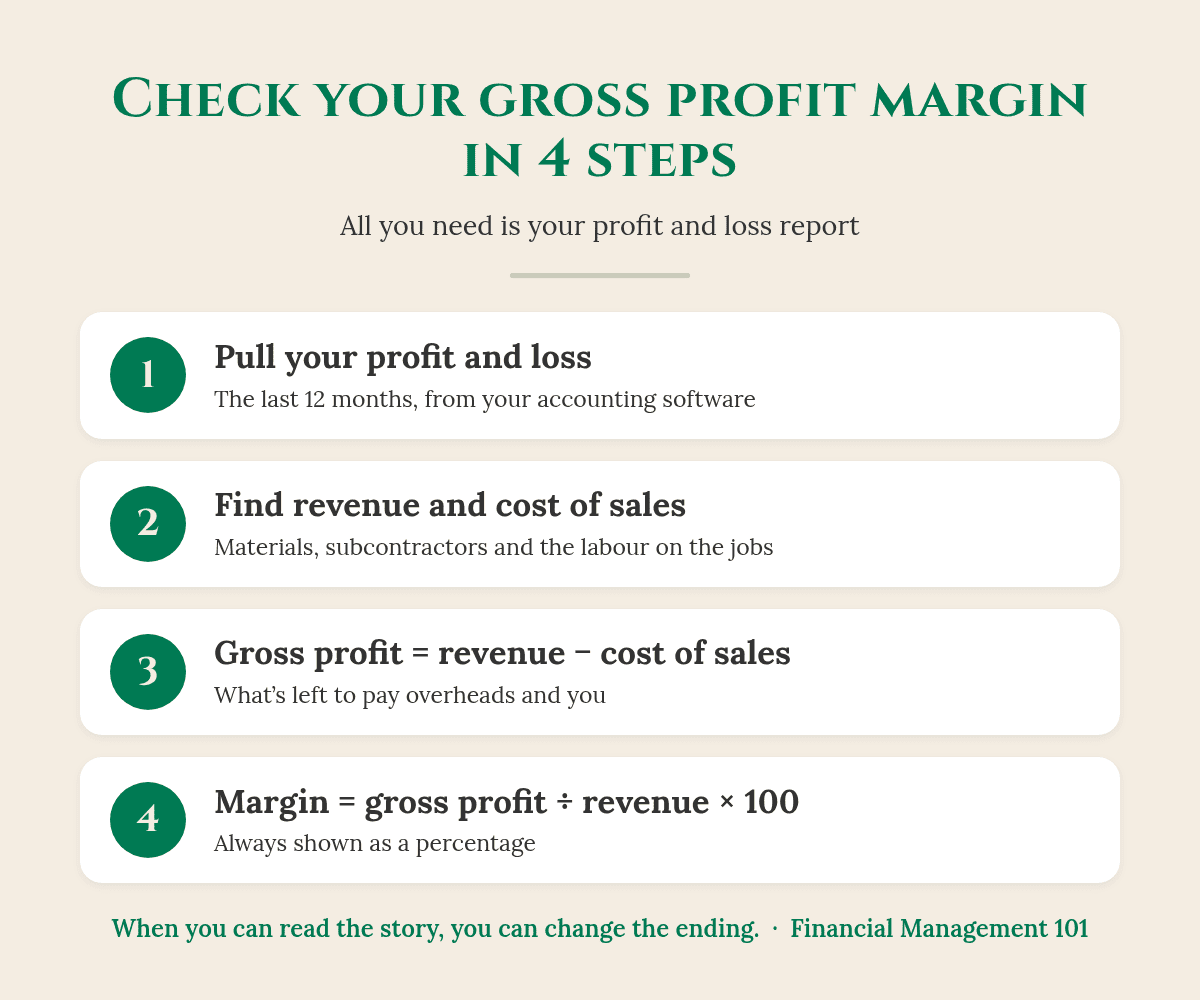
Gross profit margin is the percentage of your revenue left after you take away your cost of sales (the direct costs of the jobs, such as materials, subcontractors and the labour that goes into them). Business Queensland’s formula is gross profit ÷ total revenue × 100. It shows whether your pricing covers the work before overheads and your own pay.
What’s the difference between gross profit and net profit?
Think of your profit and loss as a story told in two chapters. business.gov.au says a profit and loss statement includes your total sales, cost of goods sold and gross profit, and that net profit is the money left over after you’ve paid your expenses (business.gov.au).
Gross profit = revenue minus the direct cost of the jobs. It answers: “Is the work itself priced well?”
Net profit = gross profit minus your overheads (rent, insurance, software, vehicles, office wages and so on). It answers: “Is the whole business making money?”
Business Queensland describes gross profit as a valuable measure of whether your pricing, sales volume and cost of goods sold will make your business a profit (Business Queensland). If the gross profit isn’t there, no amount of overhead trimming will fix it.
How do I calculate my gross profit margin?
Four steps, one report, about 15 minutes.
Business Queensland sets out the formula as gross profit ÷ total revenue × 100, and notes that margins are always shown as a percentage (Business Queensland). Here’s how to do it from your own numbers.
Pull your profit and loss for the last 12 months from Xero, MYOB or QuickBooks. A full year smooths out the busy and quiet months.
Find your revenue (sometimes called income, sales or turnover). Check whether your figures are GST-inclusive or exclusive and use the same basis throughout. business.gov.au says your profit and loss should state which it is (business.gov.au).
Find your cost of sales (also called cost of goods sold or direct costs): materials, parts, subcontractors and the wages and super of the people doing the jobs.
Subtract, then divide. Revenue minus cost of sales is your gross profit. Divide it by revenue and multiply by 100.
Check this first: Where does your field team’s labour sit? In many accounting files it’s buried in overheads, which makes gross profit look better than it really is. Ask your bookkeeper to show it in cost of sales so the number tells you the truth about each job.
So what does this actually look like?
Here’s an illustrative example (the numbers are made up to show the method, not a real client). An electrical business turns over $900,000 a year.
Materials and parts: $315,000. Field wages, super and subcontractors: $270,000. Cost of sales: $585,000.
Overheads: $225,000. Net profit: $315,000 − $225,000 = $90,000, or 10% of revenue.
On a single $4,000 job with $1,400 of materials and $1,200 of labour, that’s $1,400 of gross profit, or 35%.
Now watch what a small shift does. If the same business lifts its margin from 35% to 38% on the same revenue, gross profit rises by $27,000. That’s $27,000 more to cover overheads, pay the owner properly or build a cash buffer, without one extra job.
What is a good gross profit margin for a trades business?
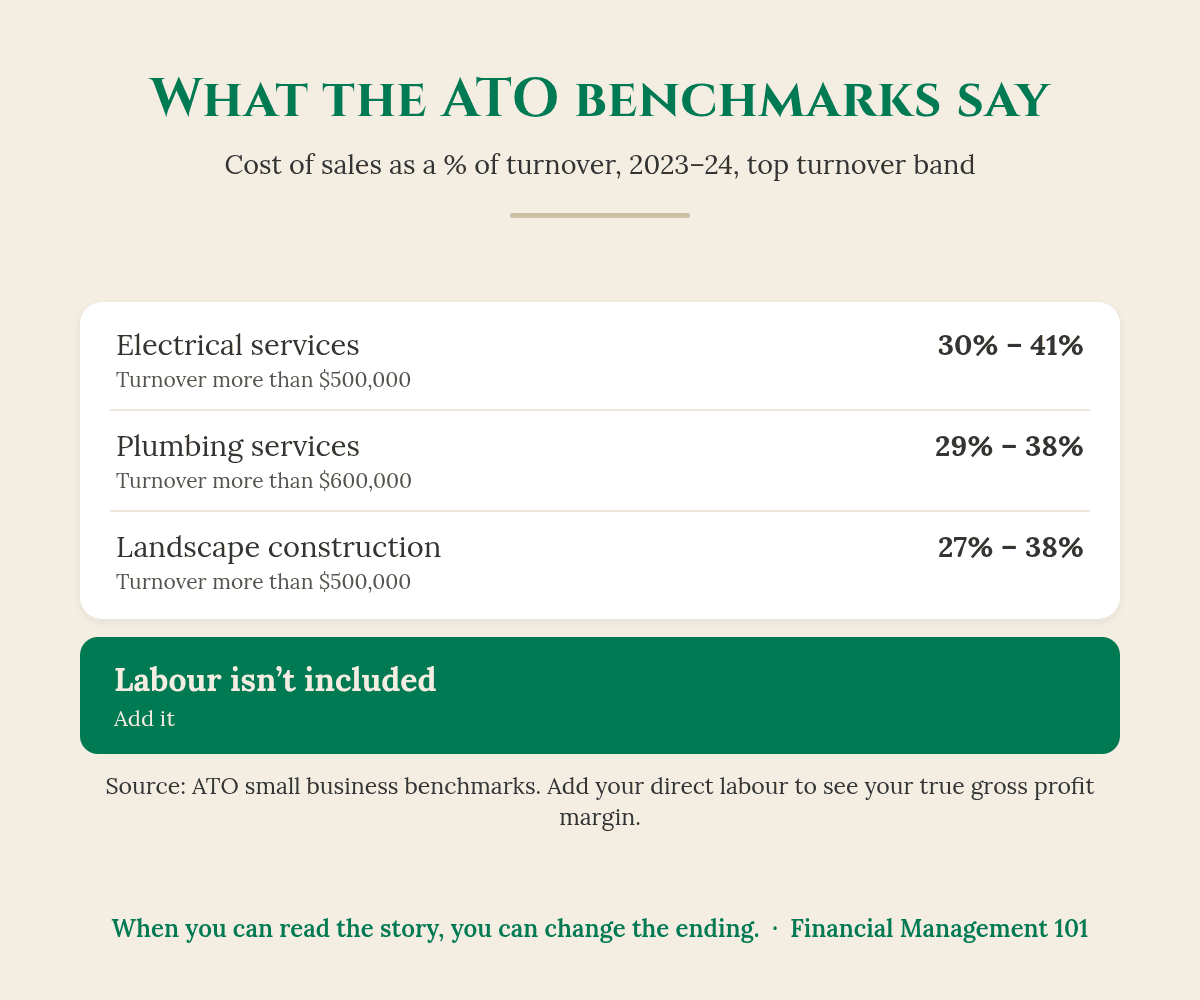
ATO 2023–24 ranges for the top turnover band. Labour isn’t included, so your true gross profit margin will be lower than 100% minus these figures.
There’s no single right number. It depends on your industry, the mix of labour and materials in your work, and how your accounts are set up. But you can sense-check yours against the ATO’s small business benchmarks, which are built from tax return data for the 2023–24 financial year (ATO).
For businesses turning over more than $500,000 (more than $600,000 for plumbers), the ATO publishes these cost of sales to turnover ranges:
30–41%
cost of sales to turnover, electrical services over $500,000. (ATO)
29–38%
cost of sales to turnover, plumbing services over $600,000. (ATO)
27–38%
cost of sales to turnover, landscape construction over $500,000. (ATO)
Watch out: The ATO’s cost of sales benchmark excludes labour (ATO). Labour is a separate benchmark. For example, the ATO’s labour to turnover range for electrical services over $500,000 is 23% to 34% (ATO). So don’t read 100% minus 35% as a 65% gross profit margin. Once you add the people doing the work, your true margin will be lower.
Your industry may be different. The ATO publishes performance benchmarks for 100 industries in its benchmarks A–Z, each with its own turnover bands, so find yours and compare like with like.
What if my numbers sit outside the ATO range?
The ATO says that if you fall outside the range for your industry, your business may have room to improve (ATO). When costs are high relative to sales, it suggests checking things like wastage, whether you could buy materials for less, and whether your mark-up is lower than your competitors’ (ATO).
Good to know: The ATO also uses benchmarks as one of the tools to identify businesses that may be avoiding their tax obligations (ATO). Another reason to make sure your records are complete and your agent/accountant is across them.
When you can read the story, you can change the ending.
Is markup the same as margin?
No, and this one trips up a lot of good operators. Markup is calculated on your cost. Margin is calculated on your price.
Say a job costs you $2,600 in materials and labour and you add a 50% markup. You quote $3,900. Your gross profit is $1,300, but your margin is $1,300 ÷ $3,900, or 33.3%, not 50%. If your target margin is 40%, a 50% markup won’t get you there.
What do I do if my gross profit margin is too low?
If your business is busy but the profit isn’t showing up, Why Is My Business Making Revenue but No Profit? is a good companion read. Start with the jobs, not the overheads. Business Queensland suggests checking the margin on specific products or services, not just the overall figure, so you can see which ones are pulling their weight (Business Queensland).
Quoting: Compare quoted hours and materials with actual hours and materials on your last 10 jobs. The gap is often where margin slips.
Materials: Check supplier pricing, wastage and whether variations and call-outs are being charged.
Labour: Look at non-chargeable time, travel and rework. Each hour that can’t be invoiced comes straight out of gross profit.
Then track it monthly. A gross profit margin that drifts down two or three points over a few months is an early warning, long before it shows up in the bank. What Numbers Should a Small Business Owner Track? shows where it fits in your weekly and monthly numbers.
How does gross profit margin connect to break-even?
Directly. Business Queensland gives a simple break-even formula: fixed costs ÷ gross profit margin (Business Queensland). In the illustrative example, $225,000 of overheads ÷ 35% means the business needs about $643,000 of revenue just to break even. Lift the margin to 38% and that falls to about $592,000.
Your takeaway
Gross profit margin = gross profit ÷ revenue × 100. It tells you whether the work itself is priced well.
Put field labour in cost of sales, so the number tells you the truth.
Use the ATO small business benchmarks as a sense check, remembering their cost of sales figure excludes labour.
If it’s low, look at pricing, quoting, materials and non-chargeable time first, then track it every month.
Your accountant makes sure the numbers are right. Your bookkeeper makes sure the records are right. My job is to help you know what to do with them, so your margin works as hard as you do.
Want to see where your profit is really going?
Start with The EDGE Business Health Check. It’s a $47 workbook that takes about 20 minutes. You score 30 quick statements across five areas: Profit & Pricing, Cashflow, CEO Visibility, Systems & Freedom, and Growth. Then the Profit Leak Calculator shows where money may be slipping away, and the 7-Day Reset gives you clear next steps.
What is a good gross profit margin for a small business?
There’s no single figure for every business. It depends on your industry and how your accounts treat labour. Check your own trend over 12 months, sense-check it against the ATO small business benchmarks for your industry, and make sure your gross profit comfortably covers your overheads and a fair wage for you.
How do I calculate gross profit margin?
Take your revenue, subtract your cost of sales (materials, subcontractors and the labour on the jobs) to get gross profit, then divide gross profit by revenue and multiply by 100. For example, $315,000 ÷ $900,000 × 100 = 35%.
What’s the difference between gross profit and net profit?
Gross profit is what’s left after the direct costs of the work. Net profit is what’s left after all your other expenses too, like rent, insurance, vehicles and office wages.
Do the ATO benchmarks include labour in cost of sales?
No. The ATO’s cost of sales to turnover benchmark excludes labour, which has its own labour to turnover benchmark. Add the two together if you want to compare against your own direct costs.
Is a 50% markup the same as a 50% margin?
No. A 50% markup on cost gives you a 33.3% gross profit margin. To earn a 50% margin, you’d need to double your cost, which is a 100% markup.
You’ve built something real. Financial confidence starts with clarity.
Karen G. Adams Small Business Performance Strategist, Financial Management 101
This article is general education only. It isn’t financial, tax or accounting advice, and it doesn’t take your personal circumstances into account. The electrical business example and all its figures are illustrative, not a real client. Check your own numbers with your bookkeeper or agent/accountant.
The BAS is due, the cash isn’t there, and the letter from the ATO is sitting unopened on the desk. If that’s where you are right now, take a breath. An ATO payment plan lets you pay what you owe in instalments, and if your business owes $200,000 or less, you may be able to set one up yourself online.
You’re far from the only one. At 30 June 2025, small businesses owed $35.9 billion of the ATO’s $54.2 billion collectable debt (ATO Annual Report 2024–25). The ATO has said $24.7 billion of that small business debt is activity statement debt (ATO).
of small business debt is activity statement debt, the BAS. (ATO)
THE SHORT ANSWER
What is an ATO payment plan?
An ATO payment plan lets your business pay an overdue tax debt in regular weekly, fortnightly or monthly instalments instead of one lump sum. If you owe $200,000 or less, you may be able to set it up online. Interest (the general interest charge) keeps building on the balance, and new tax bills must still be paid on time.
Can my business get an ATO payment plan?
If you’re having financial difficulty, you may be eligible. The ATO spreads the instalments over the shortest possible fixed period, and you must also pay any future tax debts in full and on time (ATO). How you set it up depends on how much you owe and what you need (ATO):
You owe $200,000 or less: you may be able to set it up yourself through Online services for business (Accounts and payments, then Payment plans) or the ATO’s automated phone service for business enquiries.
You have a registered tax or BAS agent/accountant: they may be able to set it up for you through Online services for agents.
You owe more, need longer than 2 years, or the online option didn’t work: you’ll need to phone the ATO’s lodge and pay enquiry line, and they’ll ask more about your circumstances.
Do I need separate ATO payment plans for income tax and BAS?
Yes. If both your income tax account and your activity statement account are overdue, the ATO needs a separate payment plan for each (ATO). You can only set up one plan at a time through online services (ATO).
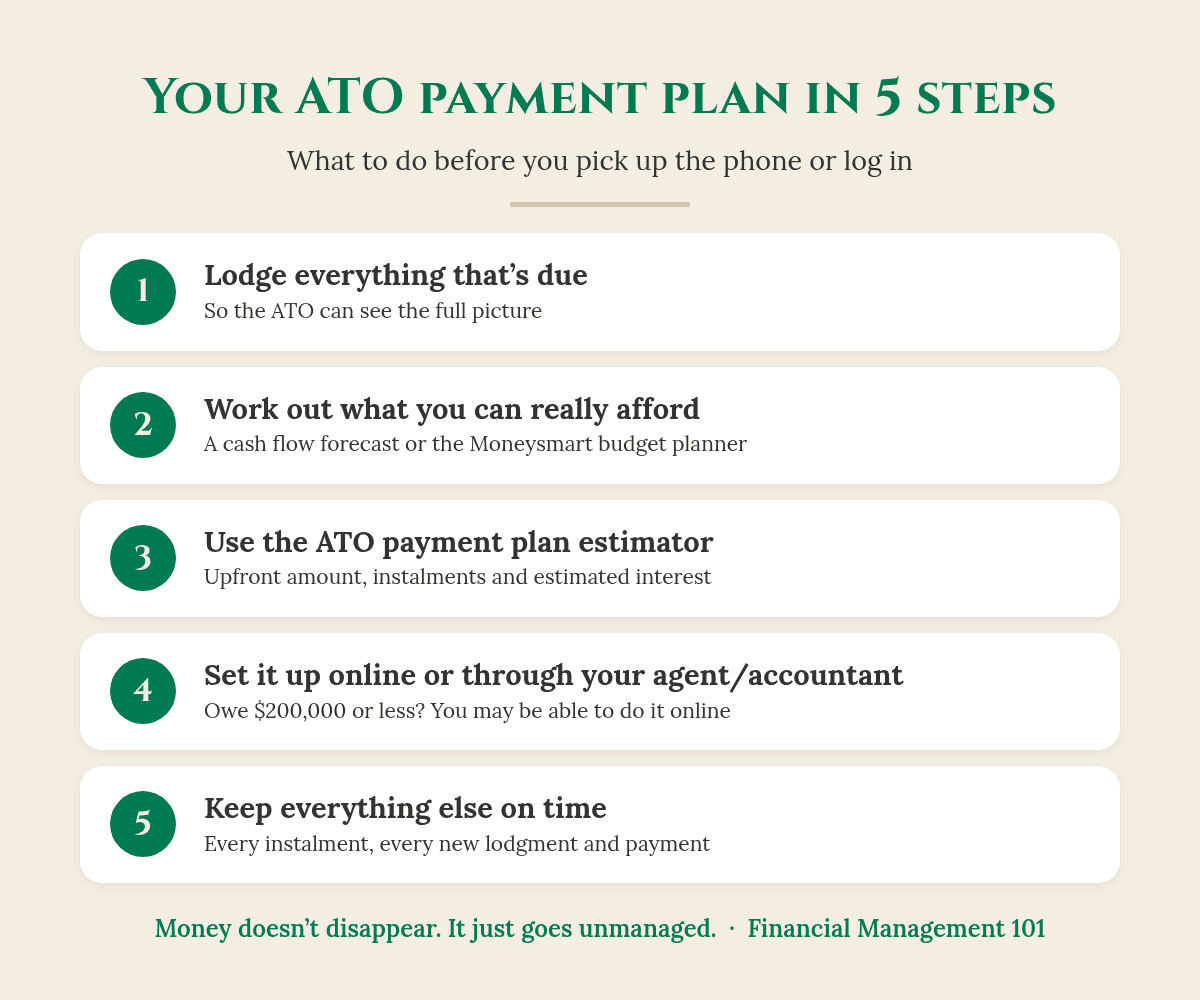
How do I set up an ATO payment plan, step by step?
Lodge, plan, estimate, set up, keep it on track.
Step 1: Lodge everything that’s due
Even if you can’t pay, get your BAS and returns lodged. The ATO says that to keep a payment plan on track you need to lodge all your obligations on time (ATO). It also means you’re working from the real number, not a guess.
Step 2: Work out what you can really afford
This is where most plans succeed or fail. Look at the next few months of cash coming in and going out, including wages, super, rent and the next BAS, and work out a figure you can pay every time. For businesses that need to phone, the ATO suggests the Moneysmart budget planner to help prepare a realistic proposal (ATO). A simple cash flow forecast does the same job for your business.
Watch out: The ATO says to take into account any payments you’ll owe for future tax and super (ATO). An instalment that leaves nothing for next quarter’s BAS just moves the problem along.
Step 3: Use the ATO payment plan estimator
The ATO’s online payment plan estimator shows how much you may need to pay upfront, your minimum repayment, how quickly you could clear the debt and an estimate of the interest. It can’t be used for super guarantee charge debts (ATO).
Step 4: Set it up online or through your agent/accountant
When you set it up, the ATO gives you an upfront amount and suggested instalments, and you can adjust both up or down within limits (ATO). Set up a direct debit at the same time. The ATO calls it the easiest way to stay on top of your instalments.
Good to know: After 30 June 2027, you won’t be able to pay the ATO by credit card. If your plan is linked to a credit card, you’ll need to change to another payment method (ATO).
Step 5: Keep every instalment, and everything else, on time
If you don’t keep up with your ongoing tax obligations, your plan may default, making the full overdue balance immediately payable. Any refunds or credits will be used to reduce the debt, but they don’t replace your instalments (ATO). You can pay extra whenever you have it, and every extra dollar cuts the interest.
How much does an ATO payment plan cost in interest?
Tax debts on a payment plan keep building general interest charge (GIC), which compounds daily (ATO). For October to December 2026, the GIC rate is 11.51% a year, or 0.03153425% a day (ATO). GIC incurred on or after 1 July 2025 can’t be claimed as a tax deduction (ATO).
So what does this actually look like?
Here’s an illustrative example (the numbers are made up to show the method, not a real client). A landscaping business owes $38,000 on its activity statement and can’t pay it in full.
At the October to December 2026 daily rate, a single 30-day month of GIC on $38,000 comes to about $361 (my working, compounding daily; the ATO works out the actual amount).
Over a longer plan, the balance falls with each instalment, but the interest keeps building on whatever’s left. That’s why the ATO guides you towards the shortest period you can manage.
If the business qualifies for the interest-free plan below, that GIC is automatically remitted as long as it keeps to the plan.
So before you pick the smallest instalment on offer, check your cash flow and pay as much as you can sustain. Then check whether you qualify for an interest-free plan.
Can I get an interest-free ATO payment plan?
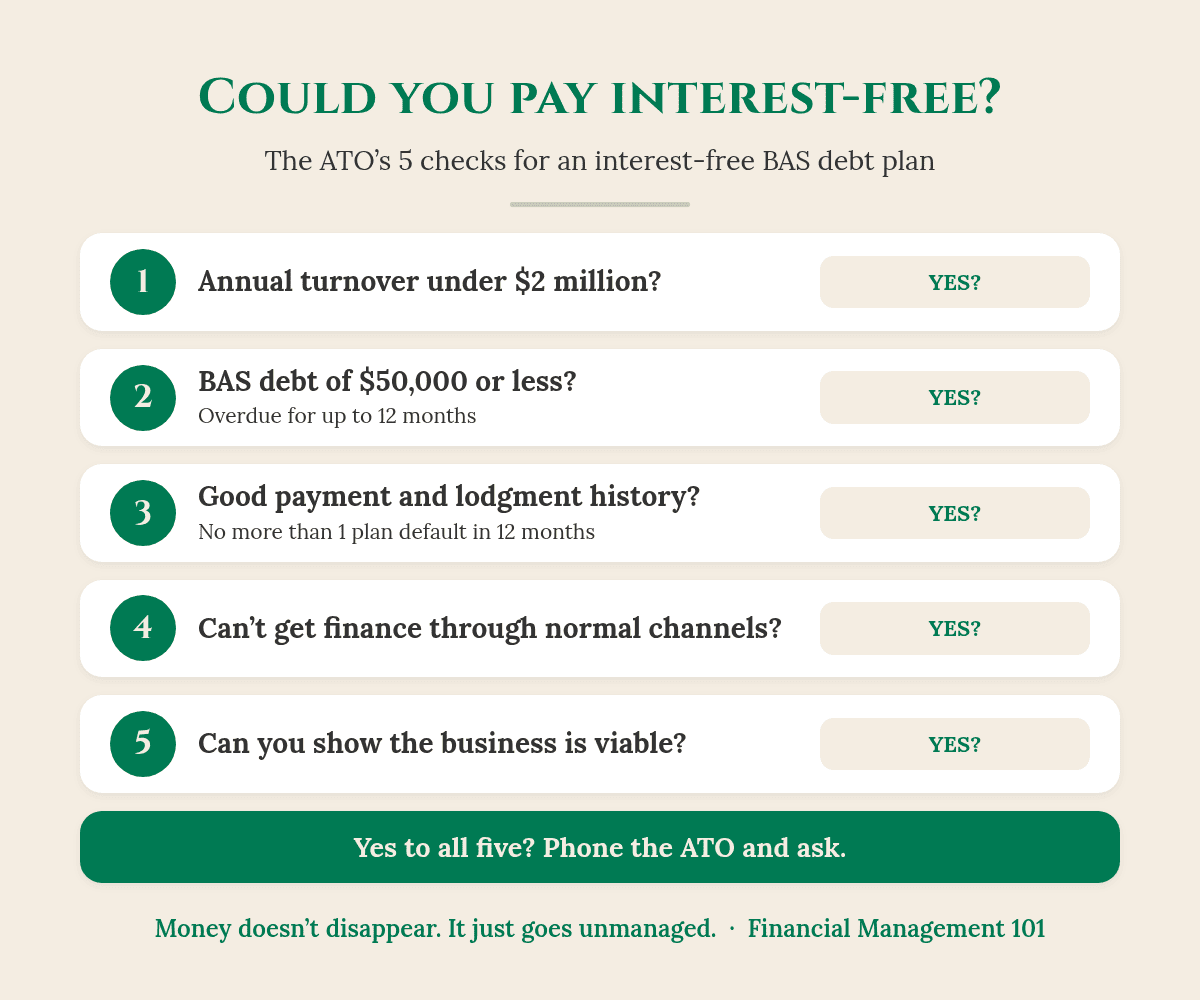
The ATO’s five eligibility checks. Meeting them means you may be eligible; the ATO decides.
Small businesses that owe activity statement amounts may be able to pay interest-free over 12 months. The ATO says you may be eligible if your business (ATO):
has an annual turnover of less than $2 million
has recent activity statement debt of $50,000 or less that’s been overdue for up to 12 months
has a good payment and lodgment history, with no more than one payment plan default in the last 12 months and no outstanding activity statement lodgments
can’t get finance (such as a loan) through normal business channels
can demonstrate ongoing viability.
You agree to pay by direct debit within 12 months. GIC still appears on your account, but as long as you keep to the plan, it’s automatically remitted (ATO). If you think you qualify, phone the ATO and ask. Your BAS or tax agent/accountant can help you check first.
Money doesn’t disappear. It just goes unmanaged.
What if I can’t keep up with my ATO payment plan?
Don’t go quiet. If you need to re-negotiate an existing plan, the ATO says to phone its lodge and pay enquiry line (ATO). Talk to your BAS or tax agent/accountant first, so you go in with a realistic number.
An ATO payment plan lets you pay an overdue debt in weekly, fortnightly or monthly instalments. If you owe $200,000 or less, you may be able to set it up online.
Lodge first, work out what you can really afford, then use the ATO’s estimator.
GIC compounds daily (11.51% a year for October to December 2026) and isn’t tax deductible, so pay it off as fast as you sustainably can.
Small businesses with BAS debt of $50,000 or less may qualify for an interest-free plan over 12 months.
Your accountant makes sure the numbers are right. Your bookkeeper makes sure the records are right. My job is to help you know what to do with them, so the next tax bill doesn’t catch you short.
Want to stop the next tax bill catching you short?
Start with The EDGE Business Health Check. It’s a $47 workbook that takes about 20 minutes. You score 30 quick statements across five areas: Profit & Pricing, Cashflow, CEO Visibility, Systems & Freedom, and Growth. Then the Profit Leak Calculator shows where money may be slipping away, and the 7-Day Reset gives you clear next steps.
The ATO spreads instalments over the shortest possible fixed period you can manage. If you need longer than 2 years to pay, you’ll need to phone the ATO’s lodge and pay enquiry line rather than setting it up online.
Is there interest on an ATO payment plan?
Yes. The general interest charge keeps building on the unpaid balance and compounds daily. It’s 11.51% a year for October to December 2026, and GIC incurred from 1 July 2025 isn’t tax deductible. The exception is the interest-free plan for eligible small business activity statement debts.
Can I pay off my ATO payment plan early?
Yes. Extra payments reduce the debt and the interest. If you pay the plan off early, the ATO says you’ll need to cancel it in online services or contact them, so the remaining direct debits stop.
What happens if I miss an ATO payment plan instalment?
If you don’t keep up with the plan and your other tax obligations, it may default, making the full overdue balance immediately payable. If you can see you’ll miss one, contact the ATO, or ask your BAS or tax agent/accountant to, before it happens.
Will my tax refund go towards my payment plan?
Yes. The ATO uses any refunds or credits you’re entitled to to reduce your tax debt. That doesn’t replace your regular instalment, so keep paying as agreed.
You’ve built something real. Financial confidence starts with clarity.
Karen G. Adams Small Business Performance Strategist, Financial Management 101
This article is general education only. It isn’t financial, tax or legal advice, and it doesn’t take your personal circumstances into account. The landscaping business example and interest figure are illustrative, not a real client or an ATO calculation. Check your own position with your BAS or tax agent/accountant or the ATO.
The bank balance looks fine today. But what will it look like in six weeks, after two pay runs, the supplier accounts, your own pay and a quiet fortnight over Christmas? If you can’t answer that with confidence, you’re not alone. A cash flow forecast for small business owners is the simplest tool I know for seeing cash trouble before it arrives.
Xero’s 2026 research with 750 Australian small business decision-makers found plenty of owners are running without a clear view of their numbers (Xero).
35%
of small business owners don’t often know whether they made a profit in the last month. (Xero, 2026)
22%
feel overwhelmed when dealing with business finances. (Xero, 2026)
41%
are too afraid to ask questions about financial management because they feel they should already know the answers. (Xero, 2026)
THE SHORT ANSWER
What is a cash flow forecast?
A cash flow forecast is an estimate of the money you expect to come into and go out of your business over the coming weeks or months. It shows your expected bank balance at the end of each period, so you can see a shortfall coming while you still have time to do something about it.
business.gov.au describes it as an estimate of your future sales and costs that helps you understand whether you’ll have enough income to cover your costs, so you can prevent cash shortages and avoid debt (business.gov.au).
Why does a cash flow forecast for small business matter so much?
Here’s the thing… profit and cash aren’t the same. You can have a profitable quarter on paper and still be short on the day wages are due, because customers haven’t paid yet, the BAS has landed, or you’ve bought materials for a big job. I’ve seen it again and again in my 40 years in financial services.
A forecast turns “I hope it’ll be fine” into “I can see week 7 is tight, so I’ll chase those two invoices now”. That’s the difference between reacting to the bank balance and running the business. If cash always feels tight even when you’re busy, read Why Is Cashflow Always Tight?
Is a cash flow forecast the same as a budget?
No. A budget is your plan for what you want to earn and spend over the financial year. A forecast uses your current figures and recent trends to estimate what’s likely to happen next. business.gov.au suggests writing your budget once a year, with a mid-year review, and updating your forecast more often, monthly or quarterly (business.gov.au).
Good to know: I like a weekly view of the next 13 weeks, which is about one quarter, because cash problems show up week by week, not month by month. That’s my working method, not a rule. The best rhythm is the one you’ll actually keep.
How do I do a cash flow forecast for my small business?
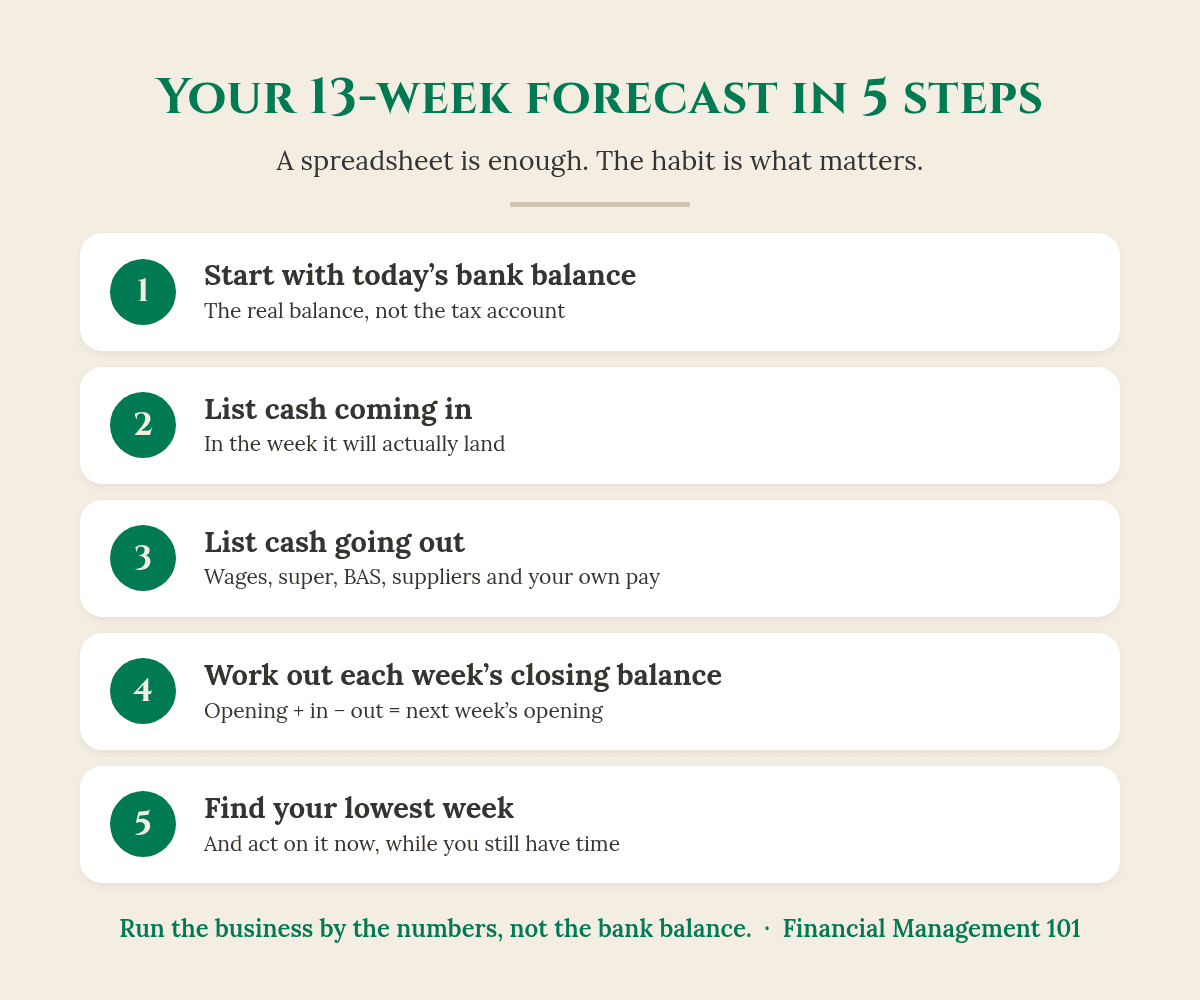
Five steps, about an hour to set up, then 15 minutes a week to keep it current.
You don’t need fancy software. A spreadsheet, or the business.gov.au cash flow statement template, is enough to start. The template is built around the same structure you’ll use: an opening balance, cash incoming, cash outgoing, the balance for the period and a closing balance (business.gov.au). Here’s how I’d build a 13-week cash flow forecast for a small business.
Step 1: Start with today’s bank balance
Use the real balance of your everyday business account today, not the “available” figure that includes an overdraft. If you keep a separate tax account, leave it out. That money is already spoken for.
Step 2: List the cash you expect to come in, week by week
Put each amount in the week you expect the money to land, not the week you send the invoice. Start with invoices already sent, then work that’s booked, then a careful estimate for new work. business.gov.au suggests forecasting incoming cash by looking at previous years, identifying seasonal trends and accounting for regular sources of income (business.gov.au).
Watch out: If a customer usually pays in 45 days, put their payment in at 45 days, even if your terms say 14. Forecast what really happens, not what should happen.
Step 3: List everything going out, and when
Wages, rent, suppliers, loan repayments, insurance, subscriptions and your own pay. Then the two that catch people out: super and the BAS.
Super: since 1 July 2026, under Payday Super, an employer’s super guarantee contribution is on time if the employee’s fund receives it within 7 business days after payday. The ATO says it’s best practice to pay it on payday (ATO). So in your forecast, super now sits next to every pay run, not at the end of the quarter.
BAS: if you report quarterly, the October to December BAS is due on 28 February. Monthly BAS is due on the 21st of the following month (ATO). Put each payment in the week it’s due.
Step 4: Work out the closing balance for each week
Opening balance, plus cash in, minus cash out, equals the closing balance. That closing balance becomes next week’s opening balance. It’s exactly how the business.gov.au template works (business.gov.au).
Check this first: Decide whether your figures include GST or not, and stick to it. business.gov.au asks you to state this clearly on its template (business.gov.au). For a cash forecast, I find GST-inclusive easiest, because that’s what actually hits the bank, as long as the BAS payment is in there too.
Step 5: Find your lowest week, and act on it
Run your eye along the closing balance line and find the lowest number. That’s your pinch point. If it’s below the minimum balance you’re comfortable with, you’ve found the problem early, and early is when you have the most options.
So what does this actually look like?
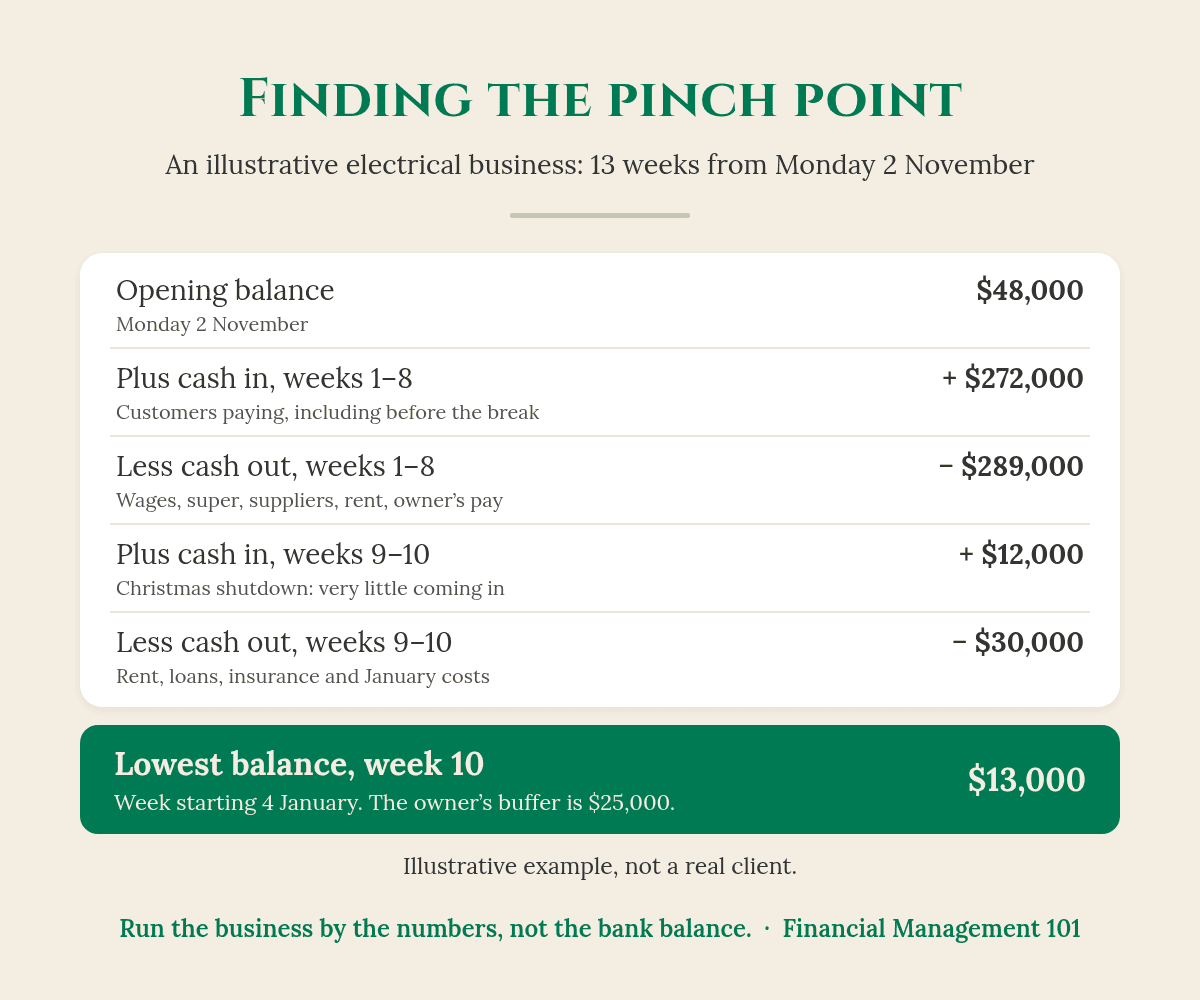
Here’s an illustrative example (the numbers are made up to show the method, not a real client). An electrical business with 5 staff starts its 13-week cash flow forecast on Monday 2 November with $48,000 in the bank. The owner likes to keep at least $25,000 as a buffer.
Weeks 1 to 7: about $36,000 a week comes in and about $33,000 a week goes out.
Week 8 (the week before Christmas): customers pay $20,000, but the last pay run, super, supplier accounts and the owner’s own pay take $58,000.
Weeks 9 and 10 (the shutdown): only $12,000 comes in, while rent, loans, insurance and early January costs take $30,000.
Illustrative example only (not a real client). Your own forecast will look different, and that’s the point.
So the business looks healthy in November, with the balance climbing to $69,000 by the end of week 7. But by the end of week 10, the week starting 4 January, it’s down to $13,000, well under the $25,000 buffer.
Because she can see it in early November, she has nine weeks to act. She chases $18,000 of overdue invoices from two builders before the break and moves a $9,000 equipment purchase to February. Her week 10 low point lifts to $40,000. Same business, same work, no January panic.
How often should I update my cash flow forecast?
Weekly, if cash is tight or you’re heading into a big season like Christmas. Monthly at the very least. business.gov.au also recommends updating your cash flow statement regularly so you can spot seasonal trends and cycles (business.gov.au).
Roll it forward every week
Pick a day, say Monday morning, and give it 15 minutes. Replace last week’s estimates with what actually happened, drop the finished week and add a new week 13 on the end. That way you always have a full quarter in view.
Compare your forecast with what actually happened
When the actual numbers are very different from your forecast, ask why. Are customers paying slower? Are costs creeping up? That’s where the real insight is. My post What Numbers Should a Small Business Owner Track? covers the other numbers worth watching each week.
You can’t fix what you can’t see coming.
What should I do if my cash flow forecast shows a shortfall?
First, take a breath. Seeing it early is the whole point. Here are the options I’d talk through with your accountant or bookkeeper:
Bring cash in sooner: chase overdue invoices, invoice on the day the job’s finished, and ask for deposits or progress payments on bigger jobs.
Push cash out later: ask suppliers about terms, and time big purchases for after your low point.
Keep the tax money separate: don’t use GST or PAYG withheld to fill the gap. If you can see you won’t be able to pay the ATO on time, talk to your BAS or tax agent/accountant early about your options.
Look at the cause: if the same gap shows up every quarter, it usually points to pricing, slow-paying customers or a feast-and-famine workload. Cash Flow Chaos explains how to break that cycle.
Your takeaway
A cash flow forecast is your expected bank balance, week by week, for the weeks ahead.
Build it from five things: today’s balance, cash in, cash out, the weekly closing balance and your lowest week.
Put money in the week it will really land or leave, including super with every pay run and the BAS when it’s due.
Roll it forward for 15 minutes every week, and act on the low point while you still have time.
Your accountant makes sure the numbers are right. Your bookkeeper makes sure the records are right. My job is to help you know what to do with them.
Want to know where your cash is going before it’s gone?
Start with The EDGE Business Health Check. It’s a $47 workbook that takes about 20 minutes. You score 30 quick statements across five areas: Profit & Pricing, Cashflow, CEO Visibility, Systems & Freedom, and Growth. Then the Profit Leak Calculator shows where money may be slipping away, and the 7-Day Reset gives you clear next steps.
What’s the difference between a cash flow forecast and a cash flow statement?
A cash flow statement records the money that actually came in and went out over a past period. A cash flow forecast uses estimates for future periods. The business.gov.au template works for both: enter actual figures for a statement, or estimated figures for each future period to make a forecast.
How far ahead should a small business forecast cash flow?
I suggest 13 weeks, rolled forward every week, for day-to-day cash decisions, plus a 12-month view for bigger plans like hiring or buying equipment. Pick the timeframe you’ll actually keep up to date.
Should my cash flow forecast include GST?
It can, as long as you’re clear about it. business.gov.au asks you to state whether your figures include or exclude GST. GST-inclusive is usually simplest for a cash forecast, as long as you also include the BAS payment in the week it’s due.
Can my bookkeeper or accountant help with a cash flow forecast?
Yes, and it’s a great use of their time. They can pull your real figures for what customers owe you and what you owe suppliers, so your forecast starts from accurate numbers. You then own the weekly habit of updating it.
How much cash buffer should a small business keep?
There’s no single number that suits every business. A practical starting point is enough to cover your next pay run, super and fixed costs, so one slow week doesn’t become a crisis. Your forecast shows whether you’re likely to stay above it.
You’ve built something real. Financial confidence starts with clarity.
Karen G. Adams Small Business Performance Strategist, Financial Management 101
This article is general education only. It isn’t financial, tax or legal advice, and it doesn’t take your personal circumstances into account. The electrical business example is illustrative, not a real client. Check your own obligations and due dates with your BAS or tax agent/accountant or the ATO.
“I spent over 40 hours this week learning a new AI tool. Crazy, hey?” That’s how I opened my latest video. Forty hours in one week, on top of running my business, networking, creating content and talking with people.
I’m going to be honest. Learning something new at this stage in my business was very humbling. There were moments when it just clicked, and moments when I wondered what on earth I’d signed up for. But I made a promise to myself that I’d stick at it, because I could see where I was heading.
Watch: I Spent Over 40 Hours Learning a New AI Tool (10:34). Watch on YouTube
This post is about what those 40 hours gave me back, why the best part wasn’t the hours at all, and what it taught me about the trade and service business owners I work with. Then I’ll walk you through The CEO Dashboard using a demo business.
THE SHORT ANSWER
What did 40 hours on a new AI tool give me back?
In my own business, it has already given me back about 100 hours, cleaned up my systems and processes, and brought the fun back. That’s my experience, in my business. Yours will look different, and that’s OK. The lesson is the same: put the setup work in once, and stop rebuilding the same things every week.
What did those 40 hours actually do?
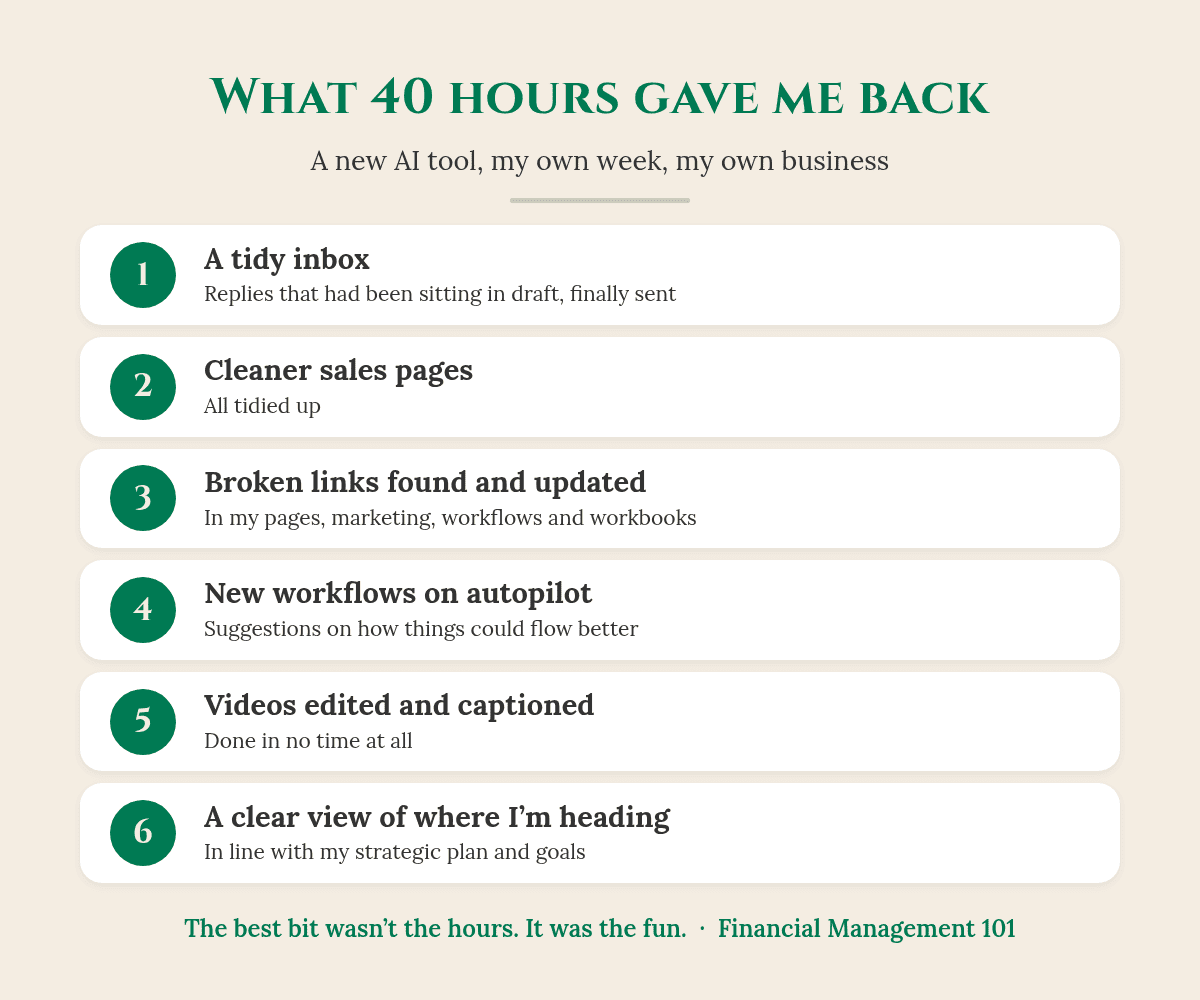
My own week: what 40 hours of learning gave back to my business. Your results will look different.
So you may be going, “40 hours, Karen, what did you do?” As I say in the video, “it cleaned up my systems and processes. You know, all the little bits that got messy as the business grew, which happens.”
My inbox: cleaned up, with replies that had been sitting in draft finally sent.
My sales pages: tidied up.
Broken links: found and updated in my pages, my marketing, and the workflows and workbooks I hand out.
New workflows: it suggested how things could flow better than the way I had them, “so now that runs on autopilot.”
My videos: it helped edit them and put in the captions, “and it took no time at all.”
It also freed me up for marketing and research I’d wanted to do for a while. As I put it, “it not only saved me time, but it saved me money.” And it gave me something I didn’t expect: a clear view that lines up with my strategic plan and my business goals. I can look at the business now and see where it’s at and where it’s heading.
Good to know: the 100 hours is my own experience in my own business, not a promise. Every business is different, and so is every tool.
The bit I really want to share isn’t the hours
It’s how it feels. It was a Saturday, and between working I was doing the washing, because that’s one of my Saturday jobs. Walking back from the washing machine, I had a spring in my step heading back to my desk. And I thought, “this is insane, why do I feel this good?”
Because I worked out I’m actually enjoying my business more. It feels less labour intensive. It’s a lot more fun. And I’m spending more time on what I love doing best: talking to business owners, picking up the phone, having great conversations and recording videos to share education with business owners.
I want to help business owners build a business that’s not only profitable, but scalable, and ultimately saleable. One of my catch cries is Make More, Keep More and Enjoy The Ride.
When you’re in business, you want to make more. You want to keep more. But you want to enjoy the ride.
What hit me was that, for a couple of months, I wasn’t enjoying as much of my business, until I put this AI tool in. It freed up the laborious, labour-intensive parts of my business that weren’t helping my clients.
Does this sound like your business?
This is exactly what I see with the trade and service business owners I work with. Good businesses. Flat out and in good demand. A great team, an accountant, and all the software.
But the owner is spending nights and weekends trying to work out where the business is actually going:
pulling reports
building spreadsheets
going through their accounting software, like Xero
checking the bank balance
and going on gut feel, as most business owners do.
Somewhere along the way, the fun just got zapped out of them. That’s what happened to me. If that’s you, my post When Did Your Business Stop Being Fun? is worth a read.
Why I built The CEO Dashboard
That’s why, a few months ago, I partnered with a developer to help build The CEO Dashboard. It’s based on the same idea as my week: “you put the setup work in once, so that you’re not rebuilding the picture every single week.”
And the best bit for business owners is that they don’t have to go through the overwhelm of building the systems themselves, the way I just did. I come in, we work out what you need, we build it for you and implement it. Then you have a system that tells you what you need to know.
Your accountant makes sure the numbers are right. Your bookkeeper makes sure the records are right. The CEO Dashboard helps you see what they’re telling you.
What does The CEO Dashboard show? A walk-through of a demo business
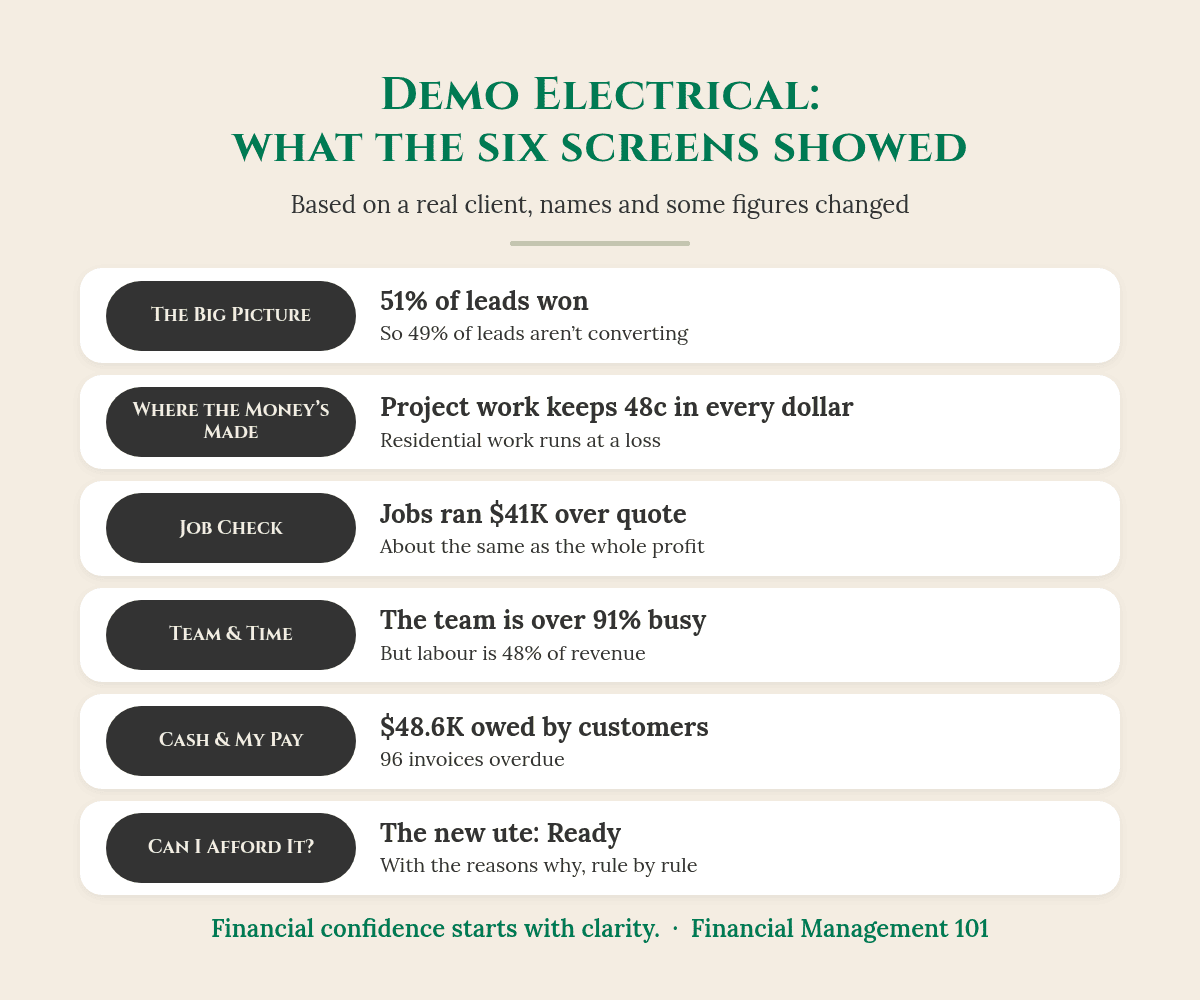
One finding from each screen in the demo business. Demo based on a real client, with names and some figures changed for privacy.
Here’s Demo Electrical. It’s a demo based on a real electrical client, with names and some figures changed to protect the business’s identity and privacy, and it covers four months of data.
The Big Picture: how’s the business going?
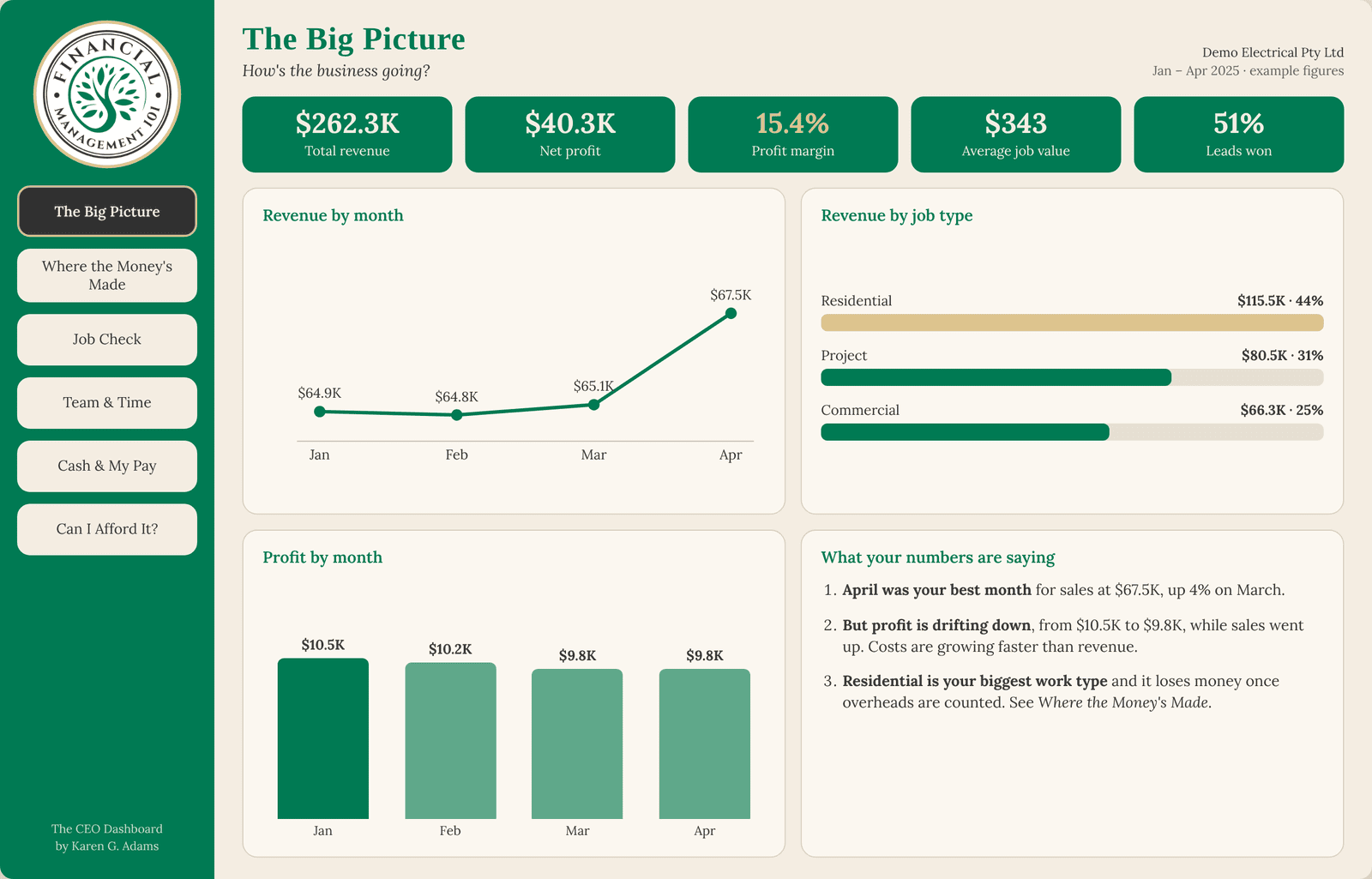
The top row shows total revenue ($262.3K), net profit ($40.3K) and profit margin (15.4%). It also shows leads won: 51%. As I say in the video, that means they’re “not converting 49% of those leads, which is where we can actually assist them and put them in touch with the right people.” The Big Picture is built to be the Monday check-in: one view of what’s happening in the business.
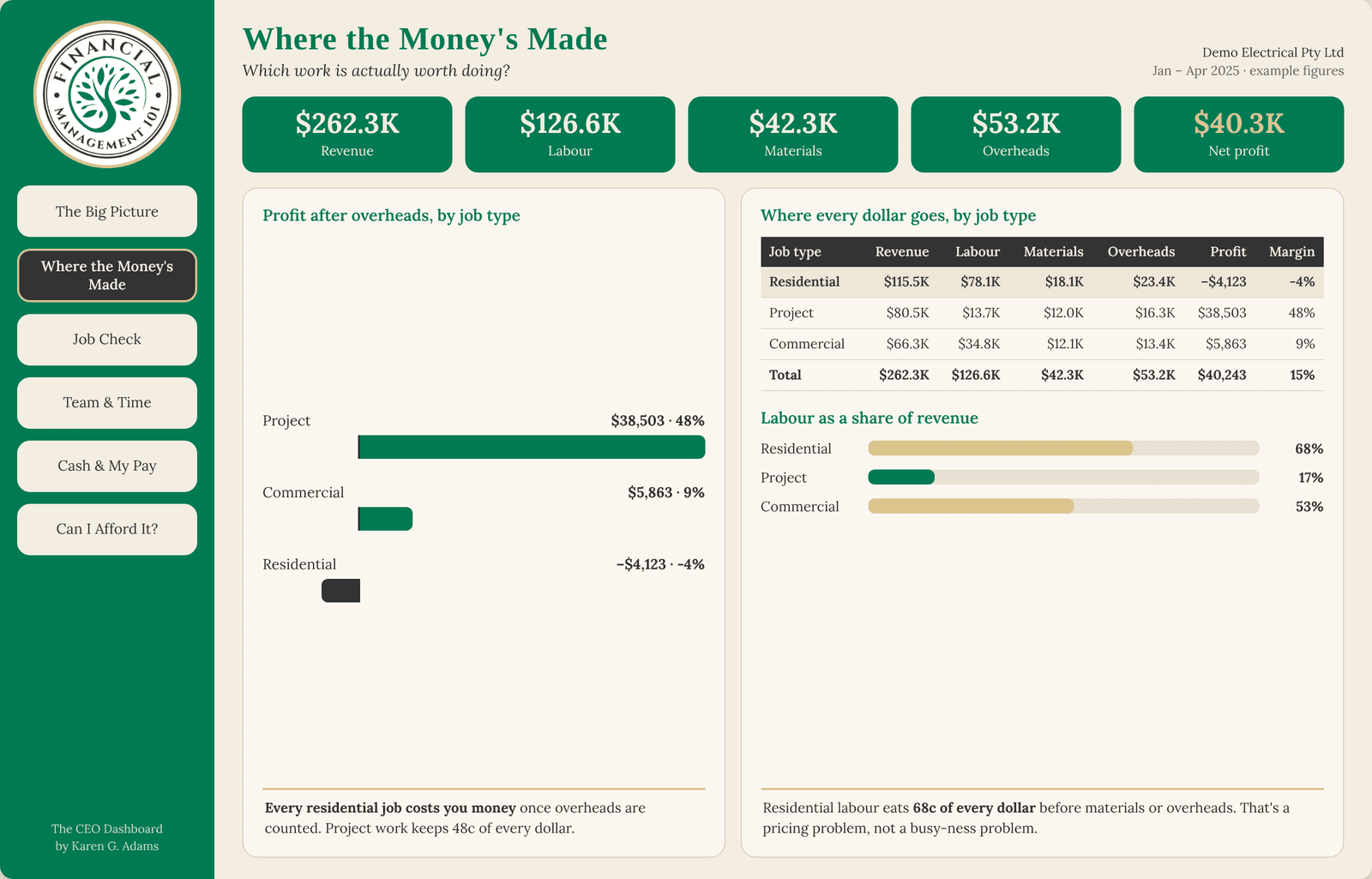
Where the Money’s Made: which work is worth doing?
This screen breaks every dollar down by job type into revenue, labour, materials, overheads and profit. In the demo, project work keeps 48c in every dollar after overheads. Residential work, the biggest job type, is running at a loss: minus $4,123. For more on why busy doesn’t always mean profitable, read Why Is My Business Making Revenue, But No Profit?
The Where the Money's Made screen. Demo based on a real client, with names and some figures changed for privacy.
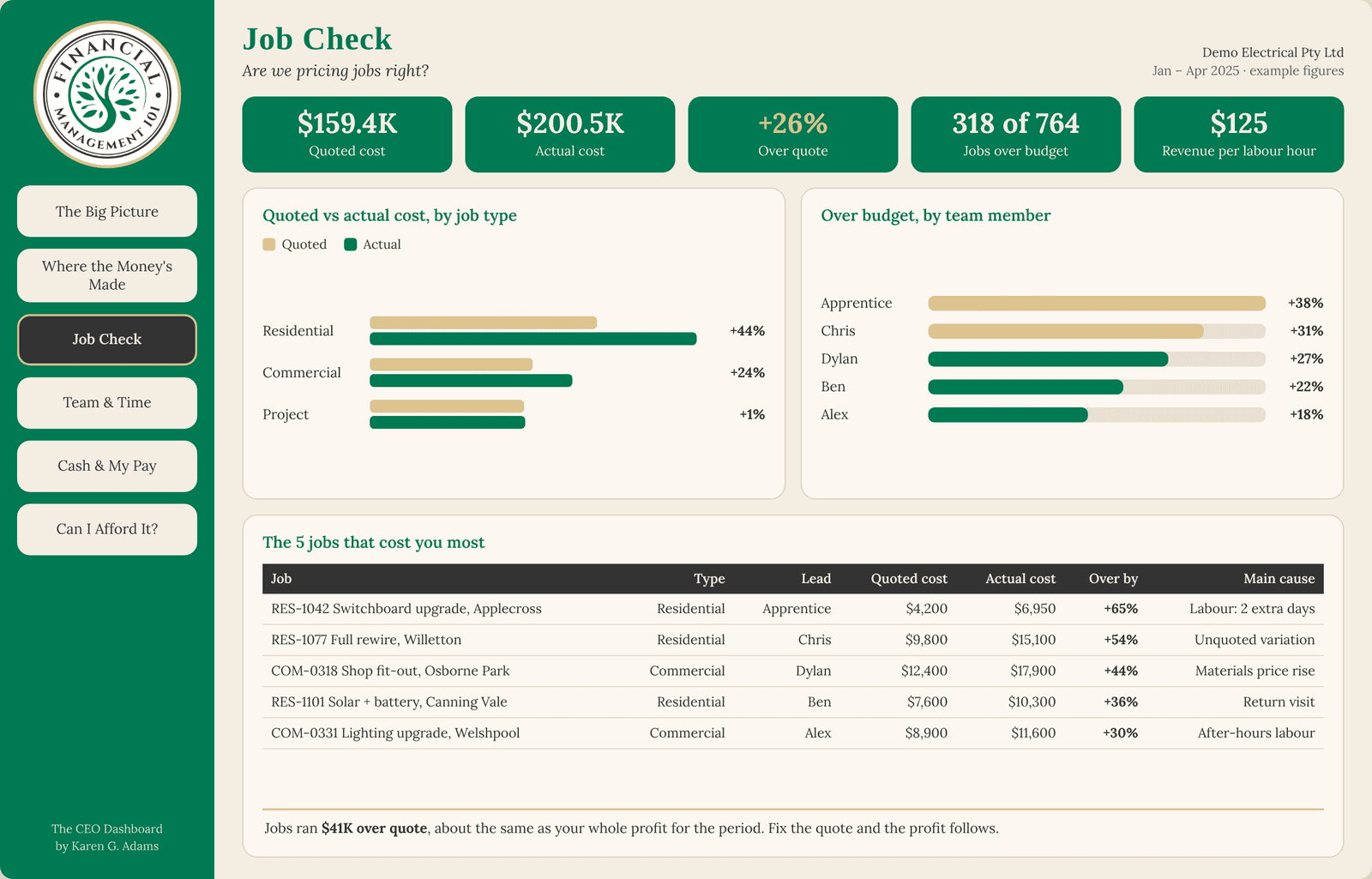
Job Check: are we pricing jobs right?
This compares what each job was quoted at with what it actually cost, shows where the team went over or under budget, and lists the five jobs that cost the most.
So what does this actually look like?
Here’s the Job Check maths for the demo business (based on a real client, with names and some figures changed for privacy):
Quoted cost: $159.4K
Actual cost: $200.5K
Over quote: about $41K, or 26%
Jobs over budget: 318 of 764
The Job Check screen. Demo based on a real client, with names and some figures changed for privacy.
Now compare that $41K with the net profit for the same four months: $40.3K. The jobs ran over quote by about as much as the business made in profit. Fix the quote, and the profit follows. You’d never see that from the bank balance.
Team & Time: who is carrying the load?
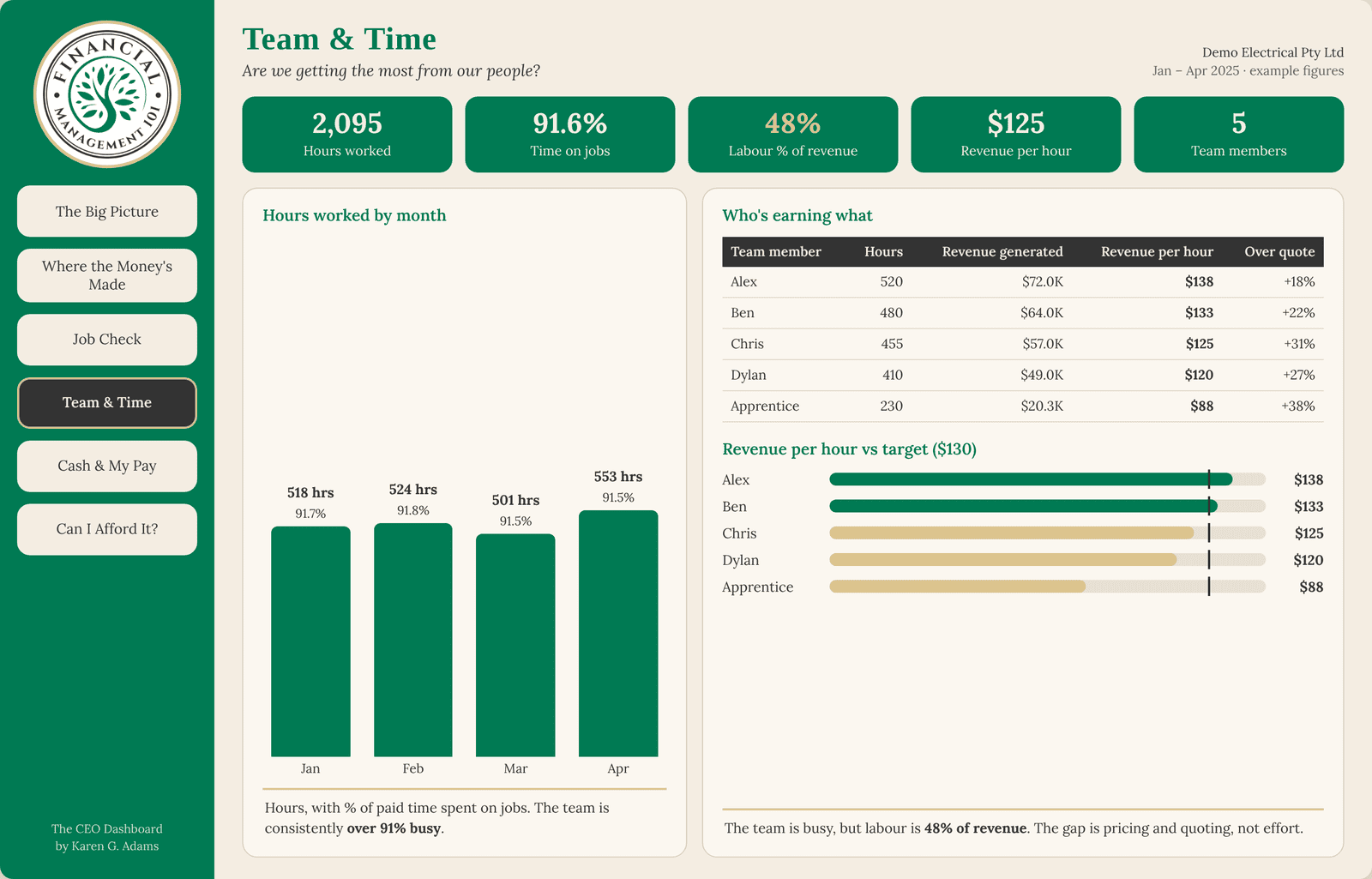
This shows revenue per hour against target, and who’s earning what. Naturally, the owner’s hours and charge-out hours are generally higher. But, as I say in the video, “this is where he was the bottleneck in the business.” The fix was to restructure a few things and help him see he needed to step away and trust his team more.
The Team & Time screen. Demo based on a real client, with names and some figures changed for privacy.
Cash & My Pay: what’s in the bank, what’s owed, what can I take?
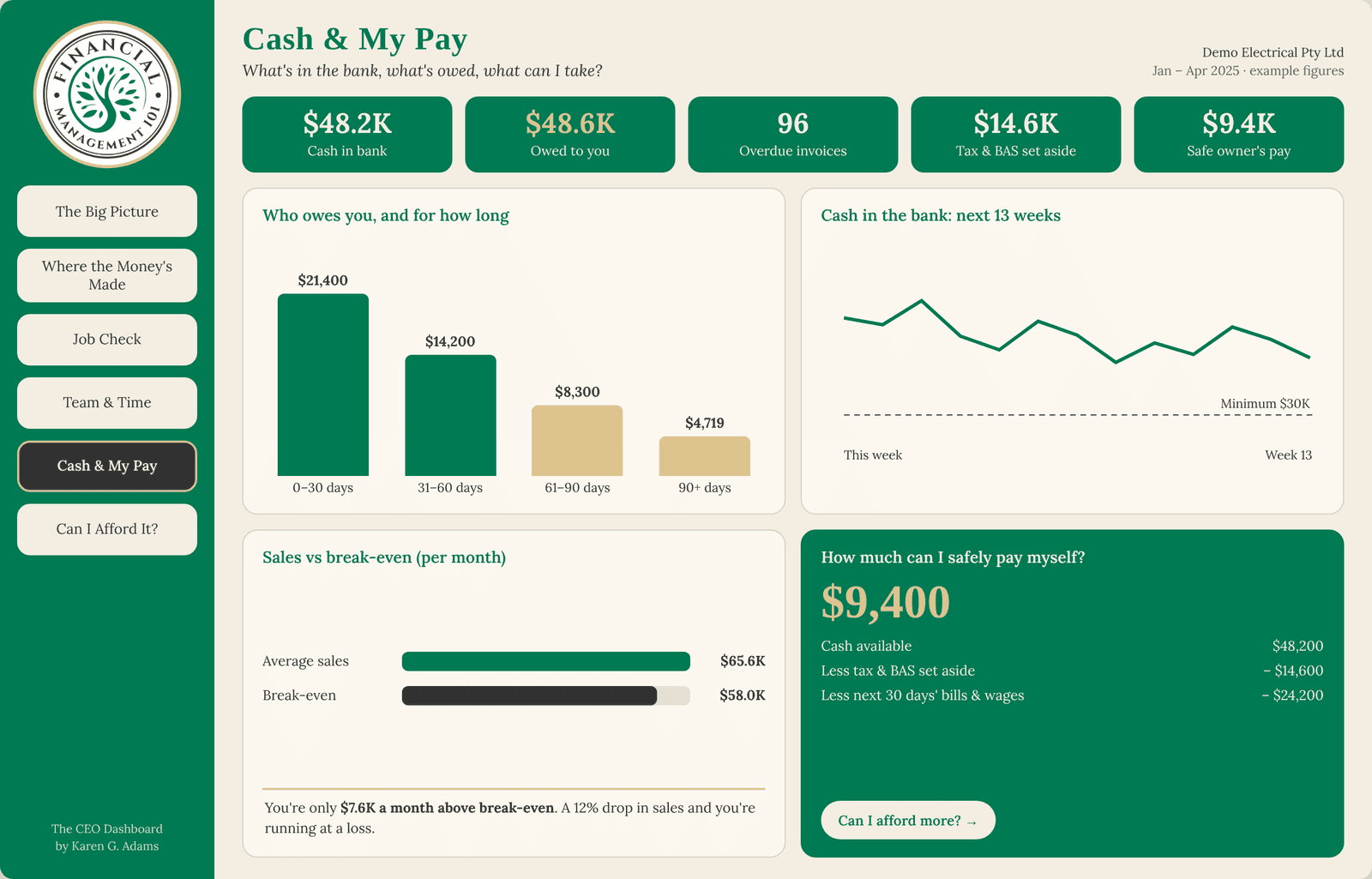
“This business owner had over $48,000 sitting in unpaid invoices,” with 96 invoices overdue. Why? He was so busy he didn’t have time to stop and do the admin to get those debtors paid. The dashboard shows how much is outstanding at 0–30 days, 31–60, 61–90 and over 90 days.
One of the things I’m most passionate about is making sure your cash available means your tax and BAS are put aside, and your bills and wages for the next 30 days are covered. That way, if there’s a slow month, there’s still money there to pay your staff and your obligations. From there, the screen shows how much the owner could safely pay himself.
Can I Afford It? The new ute
The owner wanted to buy a new ute or put on another tradie. This screen tells him whether he can afford it, and gives the reasons why he can or can’t. As I put it in the video, “this is a great one when you want to go to your finance broker and say, I want to buy the ute, it’s looking good on paper now, so can you go and do a quote.”
If this sounds like you, with a good business, flat out and missing the fun, book a call with me. It’s a 20-minute chat.
Not ready for a call? Start with The EDGE Business Health Check. It’s a $47 workbook that takes about 20 minutes, covering Profit & Pricing, Cashflow, CEO Visibility, Systems & Freedom, and Growth, with the Profit Leak Calculator to show where money may be slipping away.
Know a trade or service business owner who’s flat out and missing the fun? Send them this post.
Frequently asked questions
What did 40 hours on a new AI tool give Karen G. Adams back?
In my own business, about 100 hours back so far, a cleaned-up inbox, sales pages, links and workflows, and the fun back in my business. That’s my own experience, not a promise. Every business is different.
What does The CEO Dashboard do?
It brings your numbers together on six screens: The Big Picture, Where the Money’s Made, Job Check, Team & Time, Cash & My Pay, and Can I Afford It? So you’re not rebuilding the picture every week in spreadsheets.
Do I have to build The CEO Dashboard myself?
No. We work out what you need, build it for you and implement it, so you don’t go through the overwhelm of building the systems yourself.
Does The CEO Dashboard replace my accountant or bookkeeper?
No. Your accountant and bookkeeper keep your numbers and records right. The CEO Dashboard helps you use those numbers to run the business and make decisions.
Are the figures in the screenshots real?
They’re from Demo Electrical, a demo based on a real client, with names and some figures changed to protect the business’s identity and privacy.
You’ve built something real. Financial confidence starts with clarity.
Karen G. Adams Small Business Performance Strategist, Financial Management 101
This article is general education only. It isn’t financial, tax or legal advice, and it doesn’t take your personal circumstances into account. The hours I mention are my own experience, not a promise of results. The dashboard screenshots show a demo based on a real client, with names and some figures changed for privacy. Check your own obligations with your BAS or tax agent/accountant or the ATO.
Your bank balance tells you what’s in the account today. That’s it. It doesn’t tell you whether you can pay the team in a quiet month, whether the GST and tax money is put aside, or what’s really left once everything’s paid.
If you’ve been watching my videos and thinking, “I don’t really understand cash flow, margins or net profit. All I know is what’s coming in and what the bank says”… you’re not alone. That’s exactly who I made this short video for.
Watch: I've Got Your Back – Know Your Numbers with The CEO Dashboard (2:19). Watch on YouTube
By the end of this post you’ll know the four questions your bank balance can’t answer, why I built The CEO Dashboard, and what each of its six screens shows you, with a worked example from a demo business.
THE SHORT ANSWER
Why isn’t my bank balance enough to run my business?
Because it’s a snapshot of one day. It doesn’t show the money customers still owe you, the bills and wages due next month, or the GST and tax that’s already spoken for. As I say in the video, “what’s in the bank balance is not a true reflection of what’s going on in your business.”
What can’t your bank balance tell you?
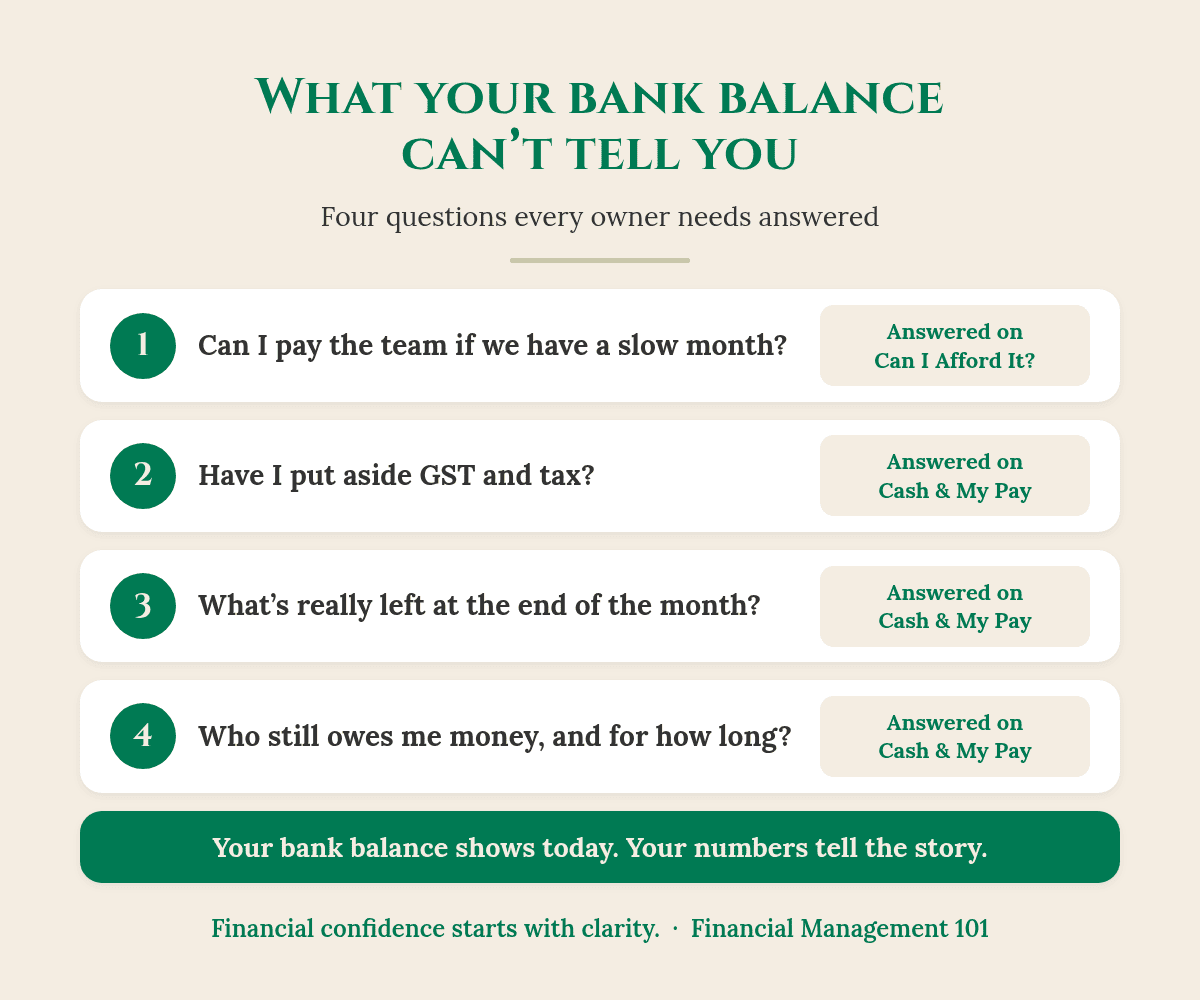
Four questions the bank balance can’t answer, and where The CEO Dashboard answers them.
In the video I ask four questions. If you can’t answer them with confidence, the bank balance is doing the steering, not you.
1. Can you pay your team if you have a slow month?
A healthy balance this week can hide a thin month ahead. What matters is whether you have enough set aside to cover wages, super and fixed costs if the work slows down for a few weeks.
2. Have you put away the GST and tax?
Some of the money sitting in your account isn’t yours to spend. It belongs to the GST, PAYG withholding and income tax you’ll pay later. If it isn’t set aside, the balance looks bigger than it really is.
Good to know: if you can see a tax payment coming that you won’t be able to cover, talk to your BAS or tax agent/accountant early. Early is when you have the most options.
3. What’s left at the end of the month?
This is the question owners ask me most: after the team, the suppliers, the tax and the bills, what’s actually left, and what can I safely pay myself? The bank balance on its own can’t answer it.
4. Who still owes you money?
You’ve done the work and sent the invoice, and now you’re waiting for customers to pay. Until they do, that money isn’t in the bank. If cash always feels tight even when you’re busy, my post Why Is Cashflow Always Tight? explains why.
Check this first: take today’s bank balance and subtract the GST and tax you owe, plus the wages and bills due in the next 30 days. What’s left is a much more honest number than the one on your banking app.
Why I built The CEO Dashboard
“I have your back. That’s why I created The CEO Dashboard.” That’s how I put it in the video, and I mean it.
“It’s to make your life so much easier so you don’t have to be an accountant to understand your business. But you do need to know what to read in the numbers of your business, so you can run it like a business owner.”
You don’t have to be an accountant to understand your business.
In my 40 years in financial services, I’ve seen plenty of capable owners running good businesses by instinct and the bank balance. They’re not behind. Nobody taught them how to read the story their numbers tell.
The CEO Dashboard was built with you in mind, so you can step into the CEO role and understand, as I say in the video, “what money’s coming in, what’s going out, and what you can afford to pay yourself.”
What’s inside The CEO Dashboard?
Six screens, each built around one question an owner actually asks.
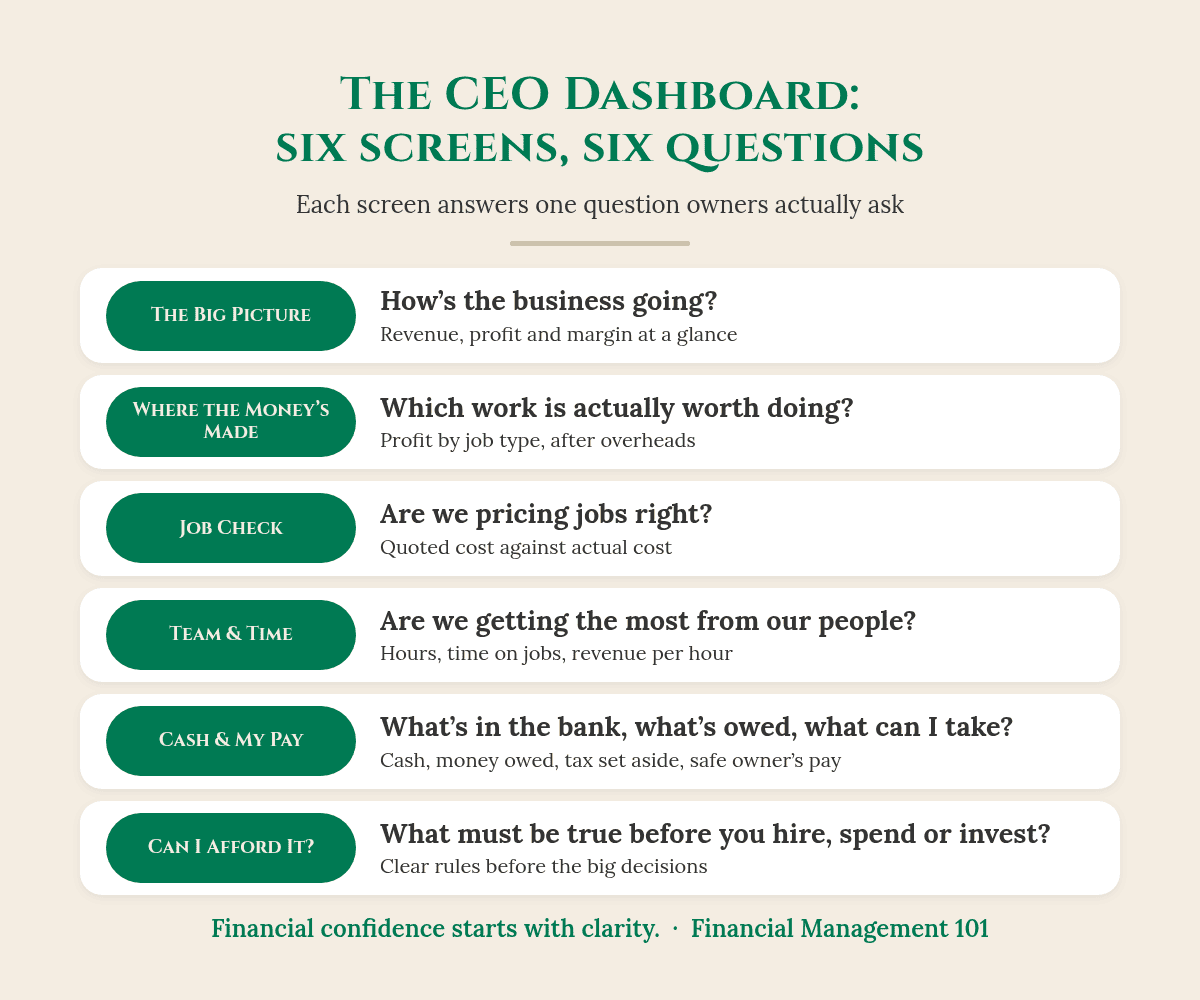
Each screen is built around one question that owners actually ask. Here are the six:
The Big Picture: how’s the business going? Revenue, profit and margin by month, in one view.
Where the Money’s Made: which work is actually worth doing, once labour, materials and overheads are counted?
Job Check: are we pricing jobs right? Quoted cost against actual cost, job by job.
Team & Time: are we getting the most from our people? Hours worked, time on jobs and revenue per hour.
Cash & My Pay: what’s in the bank, what’s owed, and what can I safely take?
Can I Afford It? What must be true before you hire, spend, discount or invest?
The Big Picture screen. Demo based on a real client, with names and some figures changed for privacy.
Look at the panel on the bottom right of The Big Picture: “What your numbers are saying.” In this demo business, April was the best month for sales, yet profit drifted down from $10.5K to $9.8K because costs grew faster than revenue. That’s the kind of story a bank balance will never show you. For a wider look at the numbers worth watching, read What Numbers Should a Small Business Owner Track?
So what does this actually look like?
Here’s the Cash & My Pay screen for the same demo business (based on a real client, with names and some figures changed for privacy). The bank balance says $48,200. Looks comfortable, right? Now watch what happens when you take out what’s already spoken for:
Cash available: $48,200
Less tax and BAS set aside: $14,600
Less the next 30 days’ bills and wages: $24,200
Safe to pay yourself: $9,400
The Cash & My Pay screen. Demo based on a real client, with names and some figures changed for privacy.
So $48,200 in the bank becomes $9,400 the owner can safely draw without touching the tax money or next month’s bills. Same business, same bank account, a very different decision.
The same screen shows $48,600 still owed by customers, with $4,719 of it more than 90 days old, plus the expected cash balance for each of the next 13 weeks. If you’d like to build that 13-week view yourself, my post on cash flow forecasting goes live this Monday and walks you through it.
Can I afford it? The question behind every big decision
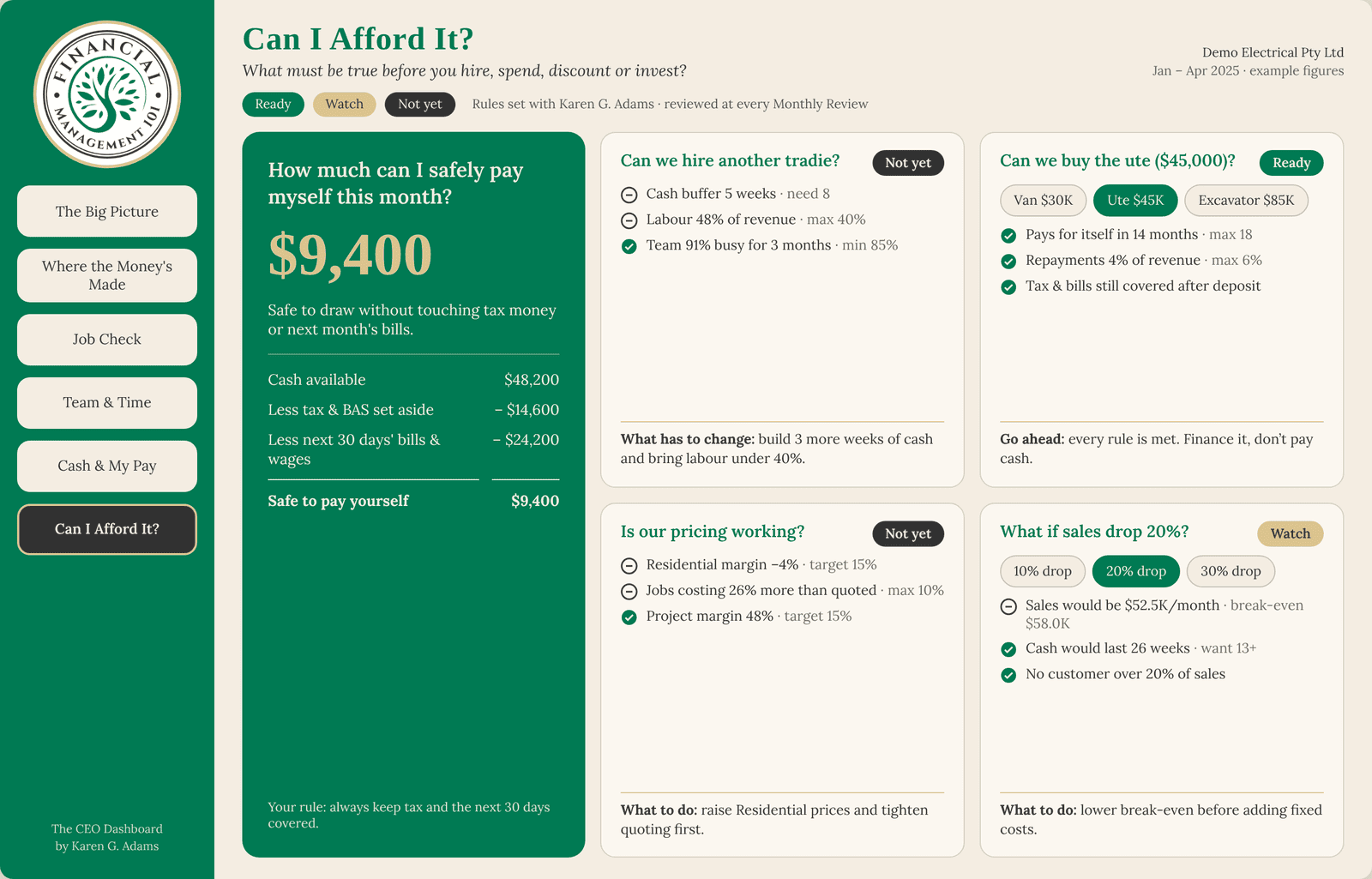
Hire another person? Buy the ute? Drop a price to win a job? The Can I Afford It? screen sets out what has to be true first, and shows each answer as Ready, Watch or Not yet.
The Can I Afford It? screen. Demo based on a real client, with names and some figures changed for privacy.
In the demo, buying a $45,000 ute is “Ready”: it pays for itself in 14 months and the tax and bills are still covered after the deposit. Hiring another tradie is “Not yet”, because the cash buffer is 5 weeks against the 8 needed and labour is 48% of revenue against a 40% limit. The screen also shows exactly what has to change before the answer becomes yes.
That’s the shift from “I think we can” to “I know we can”, before the money leaves the account.
Your takeaway
Your bank balance shows today. It doesn’t show what’s owed to you, what you owe, or what’s already set aside for tax.
Four questions to answer every month: can I pay the team in a slow month, is the GST and tax put aside, what’s really left, and who still owes me?
You don’t need to be an accountant. You do need to know how to read the story your numbers tell.
The CEO Dashboard puts that story on six screens, so you can make decisions like the CEO of your business.
Your accountant makes sure the numbers are right. Your bookkeeper makes sure the records are right. My job is to help you know what to do with them.
Rather talk it through first? book a call with me and we’ll look at what your business needs.
Know an owner who needs this? Send them this post.
Frequently asked questions
Do I need to be an accountant to use The CEO Dashboard?
No. That’s the whole point. As I say in the video, you don’t have to be an accountant to understand your business. You do need to know what to read in your numbers, and each screen is built around a plain-English question to make that easier.
Why isn’t my bank balance a true picture of my business?
Because it only shows what’s in the account today. It doesn’t take out the GST and tax you owe or the bills and wages coming up, and it doesn’t include money customers still owe you.
Does The CEO Dashboard replace my accountant or bookkeeper?
No. Your accountant and bookkeeper keep your numbers and records right. The CEO Dashboard helps you use those numbers to run the business and make decisions.
What are the six screens in The CEO Dashboard?
The Big Picture, Where the Money’s Made, Job Check, Team & Time, Cash & My Pay, and Can I Afford It? Each one answers a single question, from “how’s the business going?” to “what must be true before I hire, spend or invest?”
Are the figures in the screenshots real?
They’re from a demo based on a real client, Demo Electrical, with names and some figures changed to protect the business’s identity and privacy. Your own dashboard is built from your business’s numbers.
You’ve built something real. Financial confidence starts with clarity.
Karen G. Adams Small Business Performance Strategist, Financial Management 101
This article is general education only. It isn’t financial, tax or legal advice, and it doesn’t take your personal circumstances into account. The dashboard screenshots show a demo based on a real client, with names and some figures changed for privacy. Check your own obligations with your BAS or tax agent/accountant or the ATO.
Not in some far-off future. Right now. Xero has launched an official plugin for ChatGPT and a connector for Claude, so you can ask “What’s my cash position?” or “Who owes me money?” and get an answer pulled from your live Xero file (Xero).
So the question isn’t can you. It’s should you, and what should you check first.
Can ChatGPT or Claude read your Xero? The short answer
Yes, if you check four things first. Xero’s official connections for ChatGPT and Claude are read-only, so they can see your figures but can’t change them. Before you connect either one, know what it can see, who else can see your chats, whether your books are accurate, and how to switch it off.
If you’re curious, and a little uneasy, you’re not alone
I totally get this. You’re busy. You’ve got jobs on, staff to look after, quotes to send and a BAS that always seems to arrive sooner than you’d like. A tool that can answer money questions in plain English sounds like exactly the help you’ve been waiting for.
And at the same time, there’s a little voice saying, “Hang on. That’s all my business information. Who else gets to see it? And how safe is it?”
Both of those feelings are completely reasonable. I’m not anti-AI. I love a good shortcut as much as anyone. But in my 40 years in financial services, I’ve learned that the most expensive decisions are the ones made quickly because something looked easy.
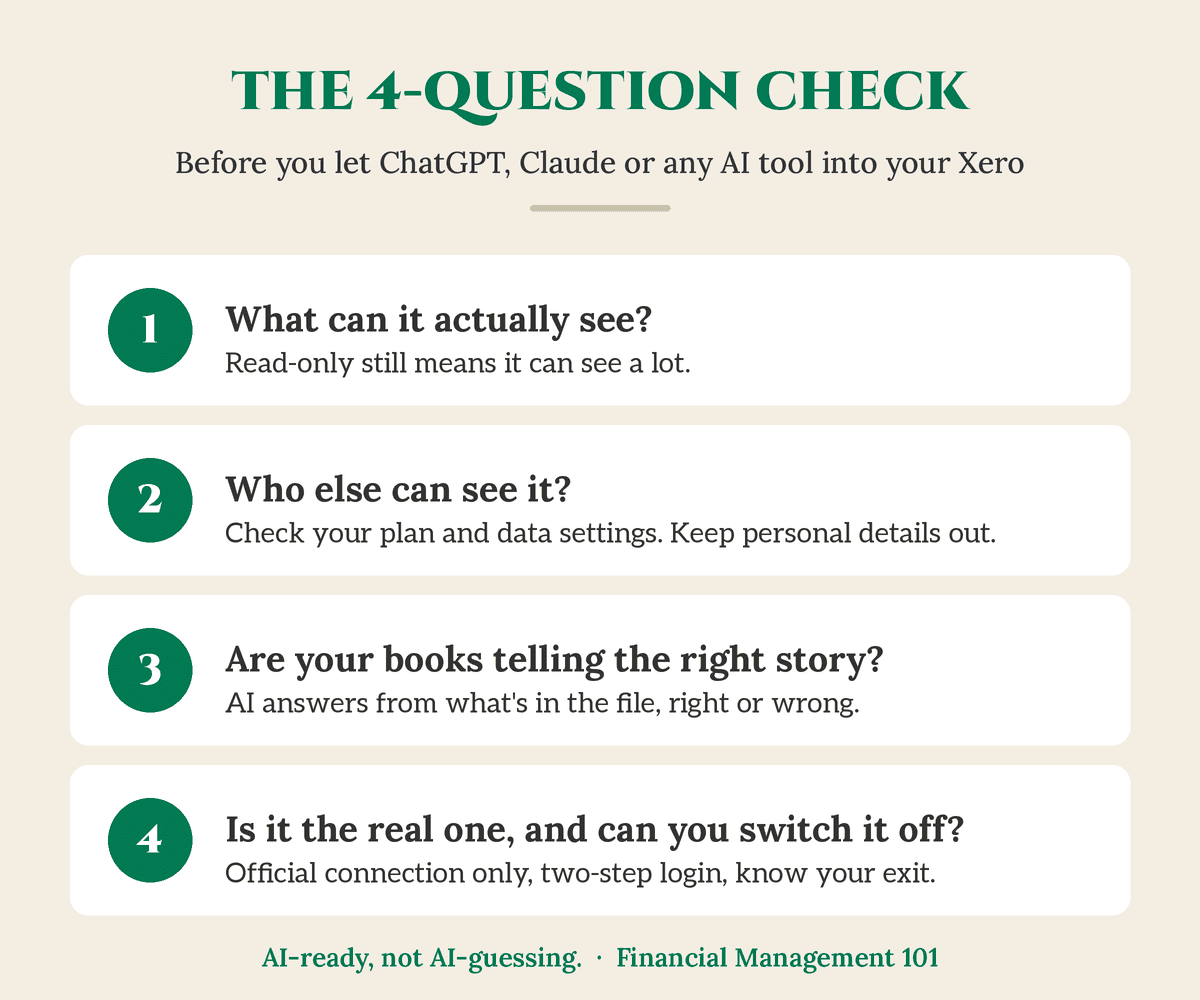
By the end of this post, you’ll have a simple four-question check you can run before you connect ChatGPT, Claude or any AI tool to your accounting software.
Run this check before you connect any AI tool to your Xero.
1. What can it actually see?
Both official connections are read-only. OpenAI lists the Xero plugin for ChatGPT as read-only (OpenAI). Xero says its Claude connector is read-only, follows your Xero permissions, and that Claude can’t create, edit, approve, reconcile or pay anything in Xero (Xero). That’s a good start.
But read-only is about changing, not seeing. A read-only connection can still look at your profit and loss, your invoices, your bills and your customer list. Xero notes that Claude reads uncoded transactions and draft invoices too.
There’s another detail worth knowing. The connection works through the Xero login of the person who sets it up, so their access is what the AI tool gets.
Check this first: Who in your business has permission to connect apps to Xero? If it’s more people than you realised, that’s worth a conversation.
What to look for: Make connecting any AI tool a deliberate owner decision, not something a team member does in passing because it looked handy.
2. Who else can see it?
Here’s the part most people don’t think about. Once Xero data shows up in an answer, it’s part of that conversation. So the settings in your ChatGPT or Claude account matter too.
If you use ChatGPT
Training. On personal ChatGPT plans (Free, Plus and Pro), there’s a setting called “Improve the model for everyone”, and it’s switched on by default. You can turn it off under Settings → Data controls (OpenAI Help). OpenAI says Business and Enterprise workspaces aren’t used for training by default.
People, location and deletion. OpenAI says a limited number of authorised staff and service providers can access content, for reasons such as investigating abuse, giving support you’ve asked for or legal matters. On personal plans, content is stored in the US and elsewhere. When you delete a chat, OpenAI says it’s removed from its systems within 30 days, unless it has to keep it for legal or security reasons.
If you use Claude
Training. Xero says data from its Claude connector isn’t used to train Anthropic’s models, and that your Claude plan and settings control how your conversations are used (Xero). On personal Claude plans (Free, Pro and Max), you choose whether your chats help improve Claude, and you can change that any time under Settings → Privacy (Anthropic).
Keeping and deleting. Anthropic says if you allow your chats to be used for training, they can be kept for up to five years. If you don’t, the standard is 30 days. Deleted chats are removed from your history straight away and from its back-end systems within 30 days (Anthropic). Team and Enterprise plans sit under Anthropic’s commercial terms, which these consumer settings don’t apply to (Anthropic).
Check this first: Are you, or anyone on your team, using a personal ChatGPT or Claude account for business questions? Is anyone putting customer names, staff pay or other personal details into it?
What to look for: Open your data or privacy settings and decide, on purpose, how you want the training setting. Delete chats you don’t need. And keep personal information out. Australia’s privacy regulator, the OAIC, recommends that businesses don’t enter personal information, especially sensitive information, into publicly available AI tools (OAIC).
3. Are your books telling the right story?
This is the bit that changes everything.
AI answers from whatever is sitting in your file. It doesn’t know what should be there. If the file’s messy, you’ll get a confident, well-written answer that’s wrong.
So what does this actually look like?
Say you ask, “Which job made me the most money last quarter?” Your bathroom renovation brought in $38,000. The real costs were $30,000, which leaves $8,000 profit.
But $12,000 of materials for that job was coded to “General Expenses” instead of the job. Now the bathroom reno looks like it cost $18,000 and made $20,000. The answer comes back polished and wrong by $12,000. And you might price your next three bathrooms on it.
That’s what I mean by AI-guessing. The tool isn’t broken. It’s working perfectly from the wrong information. Xero says it too: the value of AI depends on current, clean books, kept by accountants and bookkeepers.
Check this first: Run your profit and loss for last quarter. Does it look like the business you know?
What to look for: Big balances in “General Expenses” or “Sundry”, jobs with no materials against them, and a bank reconciliation that’s weeks behind. Those are the first things to tidy up with your bookkeeper before you ask any tool to analyse your numbers.
“Rogue bots” sounds like a movie, but the risk is ordinary.
Australia’s cyber security centre (ACSC) warns that AI systems can be tricked by prompt injection: malicious instructions disguised as legitimate requests, sometimes hidden in something the AI reads, like a web page, an email or a file (ACSC). The international security project OWASP lists prompt injection as the number one risk for AI applications (OWASP).
The other risk is old-fashioned: fake apps and phishing emails that look like Xero and ask you to “connect” or log in.
Check this first: Did you connect Xero from inside ChatGPT or Claude yourself (or from Xero)? Or did you click a link someone sent you?
Only connect apps you went looking for yourself, never from an emailed link. Xero says to forward suspicious “Xero” emails to phishing@xero.com without clicking anything (Xero).
Turn on multi-factor authentication (two-step login) in Xero and in your AI account wherever it’s offered.
Never share logins. A shared login means you can’t tell who did what.
In ChatGPT’s app permissions, choose an option that asks before taking actions. OpenAI itself labels “Allow all actions” as carrying elevated risk.
And always know your exit. In Xero, connected apps live under Settings → Connected Apps, where you can disconnect them. Xero says you can disconnect Claude in Claude or in Xero. In ChatGPT, you’ll find connected apps under Settings → Plugins (or Apps, depending on your version). Menus change from time to time, so check on your own screen. Pop a reminder in your calendar to review your Connected Apps list every quarter, and remove anything you don’t recognise.
Your takeaway
Before you let ChatGPT, Claude or any AI tool into your Xero, run the four-question check:
What can it see? Read-only still means it can see a lot.
Who else can see it? Check your data or privacy settings, delete what you don’t need, and keep personal details out.
Are your books telling the right story? AI is only as good as the numbers underneath it.
Is it the real one, and can you switch it off? Official connection only, two-step login on, no shared logins, and review Connected Apps every quarter.
None of this is about saying no to AI. It’s about saying yes on purpose.
And here’s something worth sitting with. You don’t have to paste your numbers into a chatbot to understand them. That’s why I created The CEO Dashboard: your own numbers, in your own dashboard, set up with you around the decisions you actually make, like “Can I afford it?” Then if you do bring AI in later, it has something solid to stand on. (Curious how clear your numbers are now? Try The Dashboard Test.)
AI-ready, not AI-guessing.
Your accountant makes sure the numbers are right. Your bookkeeper makes sure the records are right. My job is to help you know what to do with them.
Not sure if your numbers are ready?
Start with The EDGE Business Health Check. It’s a $47 workbook that takes about 20 minutes. Grab your last 12 months’ profit and loss report (and a cuppa), and you’ll:
Score 30 quick statements across five areas: Profit & Pricing, Cashflow, CEO Visibility, Systems & Freedom, and Growth. Together they give you your EDGE Score and show you the one area to focus on first.
Use the Profit Leak Calculator to put a dollar figure on the profit hiding in your business.
Walk away with a 7-Day Reset you can start on Monday.
Two of the CEO Visibility statements are “I look at my numbers every week, not just at tax time” and “My books are reconciled and up to date within the last fortnight”. Good habits on their own, and exactly what makes your numbers AI-ready.
Not through Xero’s official connections. OpenAI lists the Xero plugin for ChatGPT as read-only, and Xero says Claude can’t create, edit, approve, reconcile or pay in Xero. They can still see a lot, so treat the connection as a decision, not a default.
Is my Xero data used to train ChatGPT or Claude?
Xero says data from its Claude connector isn’t used to train Anthropic’s models, and OpenAI says data retrieved through the Xero plugin is used only to answer your questions. Your conversations are governed by your own account settings, so check “Improve the model for everyone” in ChatGPT or the privacy settings in Claude.
Who can see my numbers once they’re in a chat?
Both companies say a limited number of authorised people can access content in certain cases, such as abuse investigations or support you’ve asked for. That’s why I suggest keeping customer names, staff pay and other personal details out of any public AI tool.
How do I disconnect ChatGPT or Claude from Xero?
In Xero, go to Settings → Connected Apps and disconnect the app. Xero says you can also disconnect Claude from inside Claude, and ChatGPT lists connected apps in its settings. Menus change, so check on your own screen.
Do my books need to be up to date before I use AI with Xero?
Yes. AI answers from what’s in your file, right or wrong. Xero itself says the value of AI depends on current, clean books. Reconcile your bank and check your coding with your bookkeeper first.
This is the first in my six-part series, Should you let ChatGPT or Claude into your Xero? Next up: who else can see your numbers once they’re in an AI chat, and what you can do about it.
You’ve built something real. Financial confidence starts with clarity.
Karen G. Adams Small Business Performance Strategist, Financial Management 101
This article is general education only. It isn’t financial, tax, legal, privacy-compliance or IT security advice, and it doesn’t take your personal circumstances into account. If your business has turnover above $3 million or provides health services, the Privacy Act may apply to you, so check with the OAIC or your adviser. Software features, settings and menus change, so check details against your own Xero, ChatGPT and Claude accounts and talk to your accountant, bookkeeper or IT adviser before making changes. Xero, ChatGPT and Claude are trademarks of their respective owners. Financial Management 101 isn’t affiliated with or endorsed by Xero, OpenAI or Anthropic.