Xero has dozens of reports, and most owners I talk to open one, maybe two, then close the laptop. That’s normal. The good news is you don’t need them all. The Xero reports for small business owners that matter most each month come down to five, and each one answers one plain question.
This post walks through those five reports, what each one tells you, the questions to ask, an illustrative month, and how your bookkeeper keeps it all accurate so you can trust what you see.
THE SHORT ANSWER
Which Xero reports should I check every month?
Check five: the Profit and Loss, the Balance Sheet, the Aged Receivables Summary, the Aged Payables Summary and the Cash Summary. Run them once your bookkeeper has finished the month, compare with previous months, and write down one action from each.
Why a handful of reports is enough
Xero’s own 2026 research found 35% of small business owners don’t often know whether they made a profit in the last month. When tested on 10 basic business finance questions, just 37% answered them all correctly (Xero). That isn’t a talent problem. Nobody hands you a reading guide when you open your Xero file.
35%
of small business owners don’t often know if they made a profit last month. (Xero, 2026)
37%
answered all 10 basic business finance questions correctly. (Xero, 2026)
Five reports, read the same way every month, beat fifty reports read once a year. You start to see the patterns: which months are tight, which customers pay slowly, and whether your margin is holding.
The five Xero reports I’d check every month
Here they are, with the question each one answers. In Xero, you’ll find them all under the Reporting menu, then All reports, and you can search by name (Xero Central).
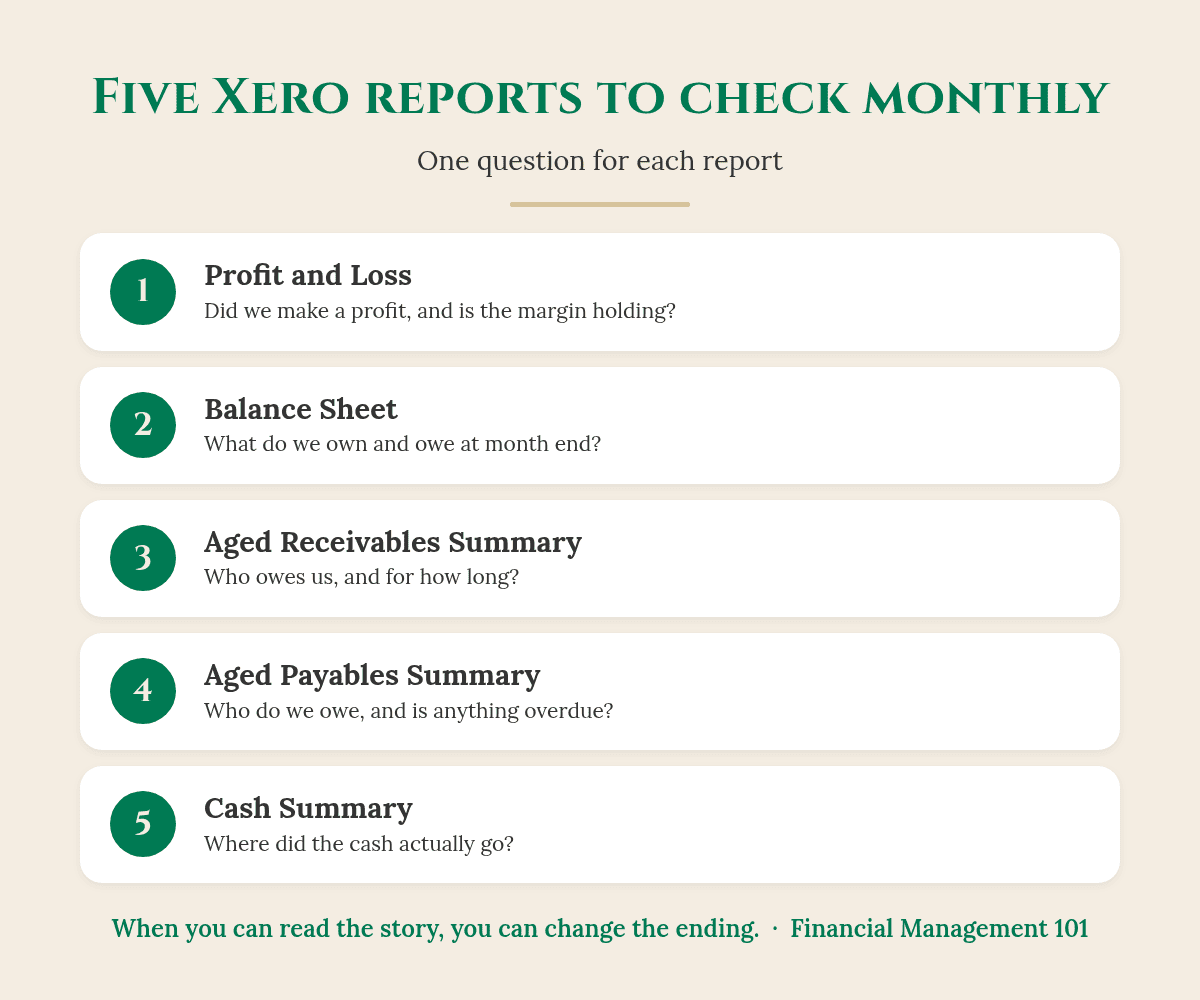
1. Profit and Loss: did we make a profit?
Xero Central describes the Profit and Loss as a snapshot of your income, expenses and profit for a report period (Xero Central). business.gov.au puts it simply: it lists your sales and expenses, and tells you how much profit you’re making or losing (business.gov.au).
- Is revenue up or down on last month, and on the same month last year?
- Is the gross profit margin holding? My post on what a good gross profit margin looks like shows how to check it.
- Did any expense line jump? Click it to see the transactions behind it.
Good to know: Xero has a common format called Current and previous 3 months, and you can add a Percentage of trading income column and a Year to date column (Xero Central). Set it up once, then save it as a custom report so it opens the same way every month.
Watch out: Xero lets you run this report on a cash or accrual basis. Cash shows money received and paid in the period; accrual shows revenue earned and expenses incurred, including unpaid invoices and bills (Xero Central). Ask your bookkeeper which one you’re looking at, and stick with it.
2. Balance Sheet: what do we own and owe?
The Balance Sheet shows your financial position as at a selected date, and you can compare it with past periods (Xero Central). It’s the report most owners skip, and it’s where a lot of the cash story lives.
- How much is in the bank compared with last month?
- What do we owe in GST, PAYG withholding and super? Is that money set aside, or is it sitting in the spending account?
- Are loans and credit cards going down, or creeping up?
3. Aged Receivables Summary: who owes us, and for how long?
This report shows how much each customer owes you and how long it’s been outstanding. It shows what was outstanding as at the report date, even if it’s been paid since, and you can age it by due date or invoice date (Xero Central).
- What’s the total owed, and is it growing faster than sales?
- Who is two months or more overdue? Those are this week’s phone calls.
- Is it the same customers every month? That’s a terms conversation, not a chasing problem.
Check this first: Run it aged by due date. That way the columns show what’s actually overdue, not just what’s old.
4. Aged Payables Summary: who do we owe?
This is the mirror image. Xero Central says it shows the amounts you owe your contacts, and whether they’re overdue (Xero Central).
- Is anything overdue that could put a supplier relationship or account at risk?
- What’s due in the next few weeks, and is the cash there to pay it?
5. Cash Summary: where did the cash go?
The Cash Summary shows the movement of cash into and out of your business for a selected period. If you compare it with the previous period or the average, Xero automatically adds a variance column showing the percentage change (Xero Central).
- Did more cash come in than went out this month?
- If profit was good but the bank went down, which line explains it? Customers paying late, a tax payment, loan repayments or money you drew out.
- Is the trend over the last few months getting better or worse?
Why it works: The Profit and Loss tells you whether you earned money. The Cash Summary tells you whether you kept it. You need both to see the full story.
So what does this actually look like?
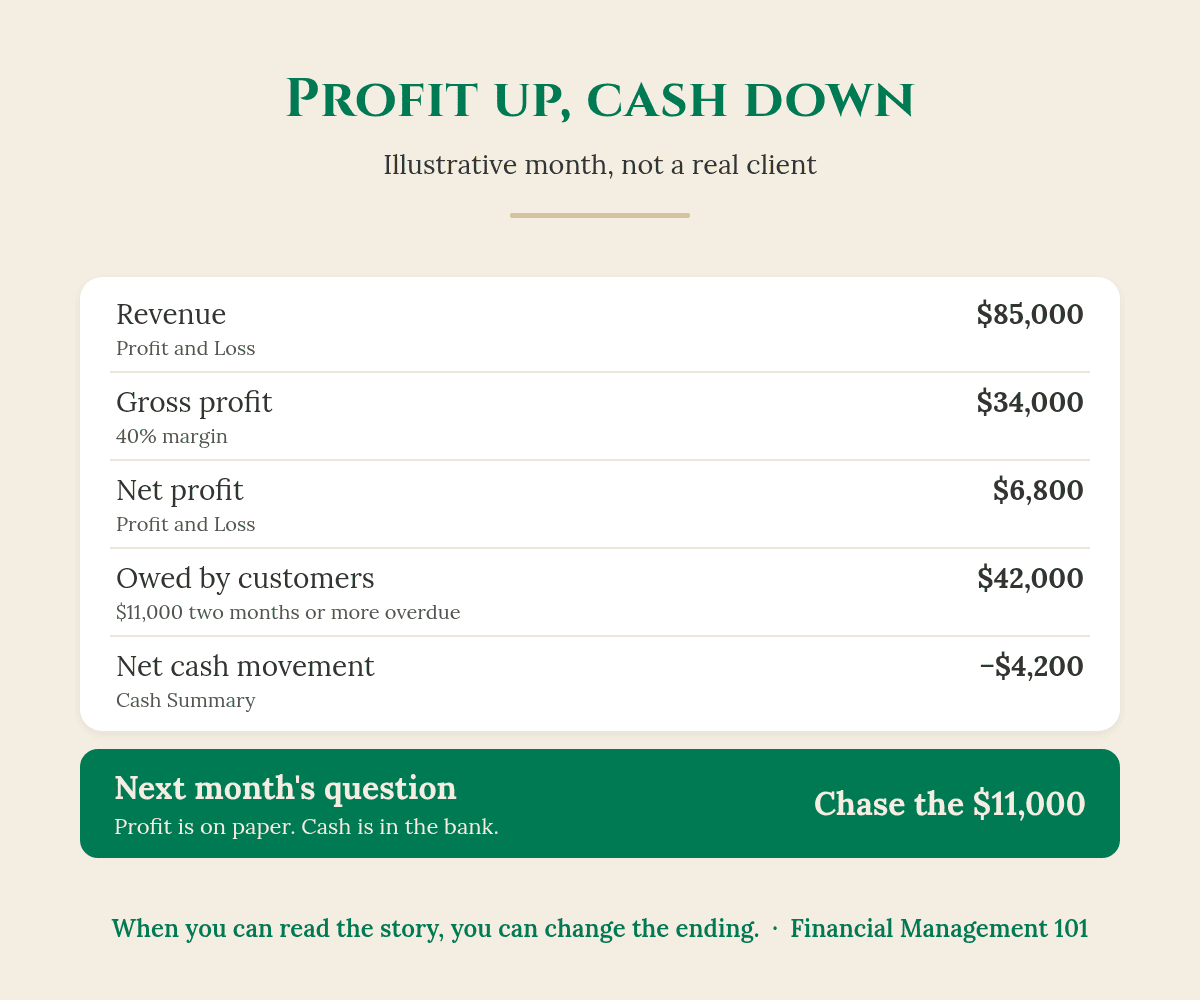
Here’s an illustrative month (made-up numbers to show the method, not a real client). Lee runs an electrical business and sits down with the five reports in the second week of the month.
- Profit and Loss: revenue $85,000, gross profit $34,000 (a 40% margin, steady on last month), net profit $6,800.
- Aged Receivables Summary: $42,000 owed, with $11,000 two months or more overdue, mostly from two builders.
- Cash Summary: net cash movement of −$4,200 for the month.
- Balance Sheet: GST and PAYG owing are higher than the amount set aside in the tax account.
- Aged Payables Summary: nothing overdue, but a large supplier account is due in two weeks.
So Lee made a profit on paper, and the bank still went backwards. The reports point straight at why: $11,000 is sitting with two customers. Lee’s actions for the month are to call both builders this week, top up the tax account, and check the supplier payment against the forecast.
That’s the whole point of the monthly look. Not more reports. One clear action from each.
How to make it a 45-minute monthly habit
- Wait until your bookkeeper has finished the month. Bank accounts reconciled, bills and invoices entered. Then the reports are worth reading.
- Run the same five reports, in the same order, every month. Save each layout as a custom report so it opens with your settings.
- Compare, don’t just look. Last month and the same month last year tell you more than one month on its own.
- Write down one action per report. Five lines in a notebook or a shared doc is enough.
- Bring the questions to your bookkeeper or agent/accountant. They’ll often know the answer in two minutes.
If you want the bigger picture of what to check weekly, monthly and quarterly, my post on how often to review your business numbers sets out a simple rhythm. And the Cash Summary looks backwards, so pair it with a 13-week cash flow forecast to look ahead.
Where your bookkeeper and accountant fit in
Your bookkeeper keeps it accurate. Reconciled bank accounts, invoices and bills entered on time, and the right accounts used, mean the reports tell the truth. If a number looks odd, they’re the first person to ask. Your agent/accountant looks after year-end, tax and compliance, and can help you read the Balance Sheet. My job is to help you use the reports to run the business: what the numbers are saying, and what to do next.
Good to know: AI tools can now connect to Xero and read these reports for you. Before you plug one in, read my post Should You Let ChatGPT or Claude Into Xero? It covers the four questions I’d ask first.
Five reports, one action each. That’s a monthly review.
Your takeaway
- You don’t need every Xero report. Five cover the monthly picture.
- Profit and Loss: did we make a profit, and is the margin holding?
- Balance Sheet: what do we own and owe, and is the tax money set aside?
- Aged Receivables and Aged Payables Summaries: who owes us, who do we owe, and what’s overdue?
- Cash Summary: where did the cash actually go?
- Run them after your bookkeeper finishes the month, compare with past periods, and write down one action from each.
Want to see where your numbers are telling you to look?
Start with The EDGE Business Health Check. It’s a $47 workbook that takes about 20 minutes. You score 30 quick statements across five areas: Profit & Pricing, Cashflow, CEO Visibility, Systems & Freedom, and Growth. Then the Profit Leak Calculator shows where money may be slipping away, and the 7-Day Reset gives you clear next steps.

Rather talk it through first? Get in touch and book a call with me.
Frequently asked questions
What are the most important Xero reports for a small business?
For a monthly review, I’d start with five: the Profit and Loss, Balance Sheet, Aged Receivables Summary, Aged Payables Summary and Cash Summary. Together they show profit, financial position, who owes you, who you owe, and where the cash went.
Where do I find reports in Xero?
Xero Central says to open the Reporting menu, select All reports, then find the report by name. You can use the search field in the top right corner.
What’s the difference between the Profit and Loss and the Cash Summary?
The Profit and Loss shows income, expenses and profit for a period. The Cash Summary shows the movement of cash into and out of the business. A business can show a profit and still have less cash at the end of the month, often because customers haven’t paid yet.
Should I run my Profit and Loss on a cash or accrual basis?
Xero lets you choose. Cash shows money received and paid in the period; accrual includes unpaid invoices and bills. Ask your bookkeeper or agent/accountant which suits your business, and use the same basis every month so the comparisons make sense.
When in the month should I look at my Xero reports?
Once your bookkeeper has reconciled the bank accounts and entered the month’s invoices and bills. For many businesses that’s in the first week or two of the following month.
You’ve built something real. Financial confidence starts with clarity.
Karen G. Adams
Small Business Performance Strategist, Financial Management 101
Too Big To Wing It. Too Small To Need A CFO.
This article is general education only. It isn’t financial, tax or accounting advice, and it doesn’t take your circumstances into account. Lee’s electrical business and all its figures are illustrative, not a real client. Xero report names, descriptions and menu paths are from Xero Central as at 9 November 2026; Xero updates its software, so menus may change. Research figures are from Xero’s media release of 13 August 2026 (survey of 750 small business decision-makers and 500 accountants and bookkeepers, conducted 20 March to 15 April 2026). Xero is a third-party product; Financial Management 101 isn’t affiliated with Xero. Check with your bookkeeper or agent/accountant about your own reports.