“I spent over 40 hours this week learning a new AI tool. Crazy, hey?” That’s how I opened my latest video. Forty hours in one week, on top of running my business, networking, creating content and talking with people.
I’m going to be honest. Learning something new at this stage in my business was very humbling. There were moments when it just clicked, and moments when I wondered what on earth I’d signed up for. But I made a promise to myself that I’d stick at it, because I could see where I was heading.
This post is about what those 40 hours gave me back, why the best part wasn’t the hours at all, and what it taught me about the trade and service business owners I work with. Then I’ll walk you through The CEO Dashboard using a demo business.
THE SHORT ANSWER
What did 40 hours on a new AI tool give me back?
In my own business, it has already given me back about 100 hours, cleaned up my systems and processes, and brought the fun back. That’s my experience, in my business. Yours will look different, and that’s OK. The lesson is the same: put the setup work in once, and stop rebuilding the same things every week.
What did those 40 hours actually do?
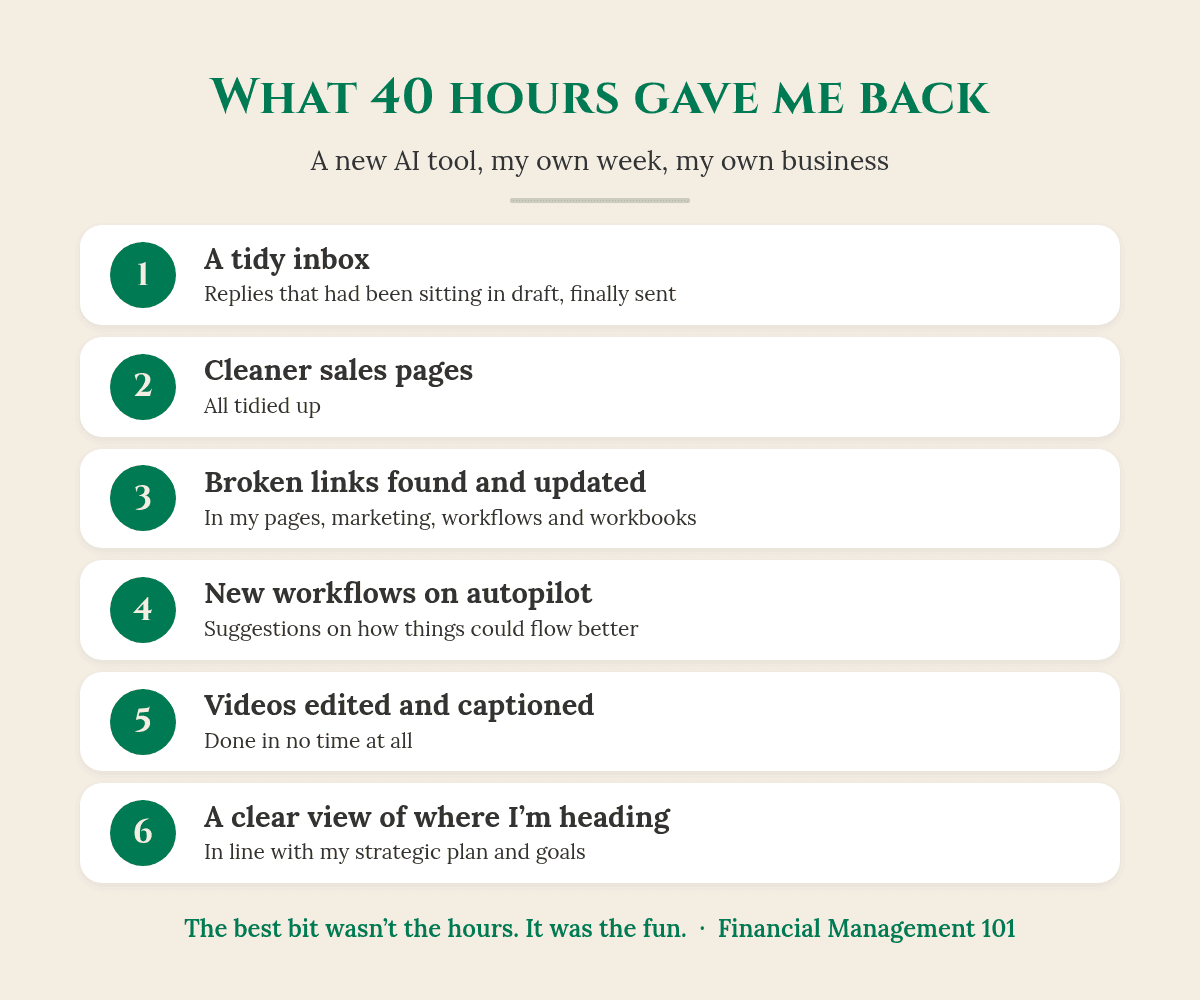
So you may be going, “40 hours, Karen, what did you do?” As I say in the video, “it cleaned up my systems and processes. You know, all the little bits that got messy as the business grew, which happens.”
- My inbox: cleaned up, with replies that had been sitting in draft finally sent.
- My sales pages: tidied up.
- Broken links: found and updated in my pages, my marketing, and the workflows and workbooks I hand out.
- New workflows: it suggested how things could flow better than the way I had them, “so now that runs on autopilot.”
- My videos: it helped edit them and put in the captions, “and it took no time at all.”
It also freed me up for marketing and research I’d wanted to do for a while. As I put it, “it not only saved me time, but it saved me money.” And it gave me something I didn’t expect: a clear view that lines up with my strategic plan and my business goals. I can look at the business now and see where it’s at and where it’s heading.
Good to know: the 100 hours is my own experience in my own business, not a promise. Every business is different, and so is every tool.
The bit I really want to share isn’t the hours
It’s how it feels. It was a Saturday, and between working I was doing the washing, because that’s one of my Saturday jobs. Walking back from the washing machine, I had a spring in my step heading back to my desk. And I thought, “this is insane, why do I feel this good?”
Because I worked out I’m actually enjoying my business more. It feels less labour intensive. It’s a lot more fun. And I’m spending more time on what I love doing best: talking to business owners, picking up the phone, having great conversations and recording videos to share education with business owners.
I want to help business owners build a business that’s not only profitable, but scalable, and ultimately saleable. One of my catch cries is Make More, Keep More and Enjoy The Ride.
When you’re in business, you want to make more. You want to keep more. But you want to enjoy the ride.
What hit me was that, for a couple of months, I wasn’t enjoying as much of my business, until I put this AI tool in. It freed up the laborious, labour-intensive parts of my business that weren’t helping my clients.
Does this sound like your business?
This is exactly what I see with the trade and service business owners I work with. Good businesses. Flat out and in good demand. A great team, an accountant, and all the software.
But the owner is spending nights and weekends trying to work out where the business is actually going:
- pulling reports
- building spreadsheets
- going through their accounting software, like Xero
- checking the bank balance
- and going on gut feel, as most business owners do.
Somewhere along the way, the fun just got zapped out of them. That’s what happened to me. If that’s you, my post When Did Your Business Stop Being Fun? is worth a read.
Why I built The CEO Dashboard
That’s why, a few months ago, I partnered with a developer to help build The CEO Dashboard. It’s based on the same idea as my week: “you put the setup work in once, so that you’re not rebuilding the picture every single week.”
And the best bit for business owners is that they don’t have to go through the overwhelm of building the systems themselves, the way I just did. I come in, we work out what you need, we build it for you and implement it. Then you have a system that tells you what you need to know.
Your accountant makes sure the numbers are right. Your bookkeeper makes sure the records are right. The CEO Dashboard helps you see what they’re telling you.
What does The CEO Dashboard show? A walk-through of a demo business
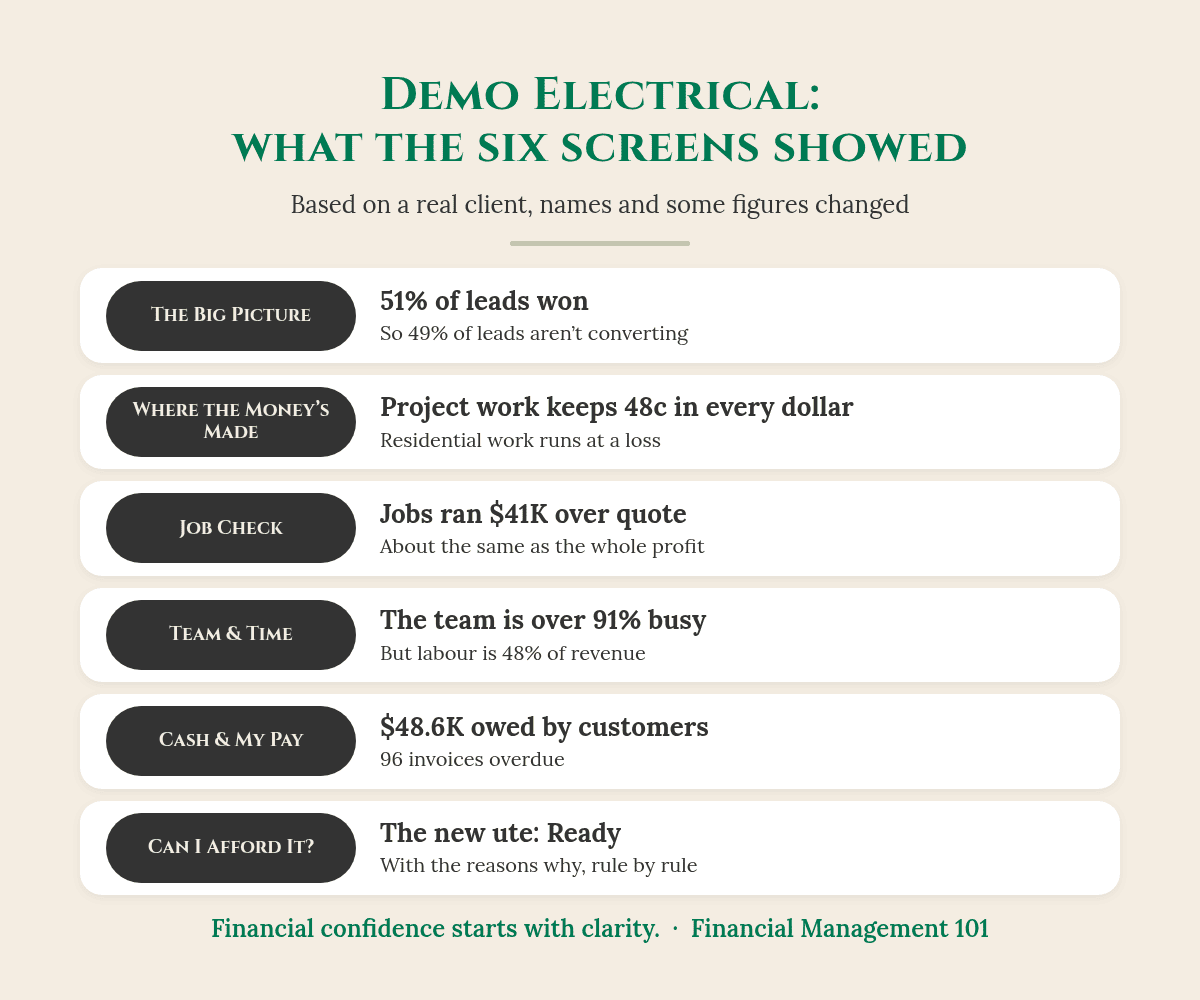
Here’s Demo Electrical. It’s a demo based on a real electrical client, with names and some figures changed to protect the business’s identity and privacy, and it covers four months of data.
The Big Picture: how’s the business going?
The top row shows total revenue ($262.3K), net profit ($40.3K) and profit margin (15.4%). It also shows leads won: 51%. As I say in the video, that means they’re “not converting 49% of those leads, which is where we can actually assist them and put them in touch with the right people.” The Big Picture is built to be the Monday check-in: one view of what’s happening in the business.
Where the Money’s Made: which work is worth doing?
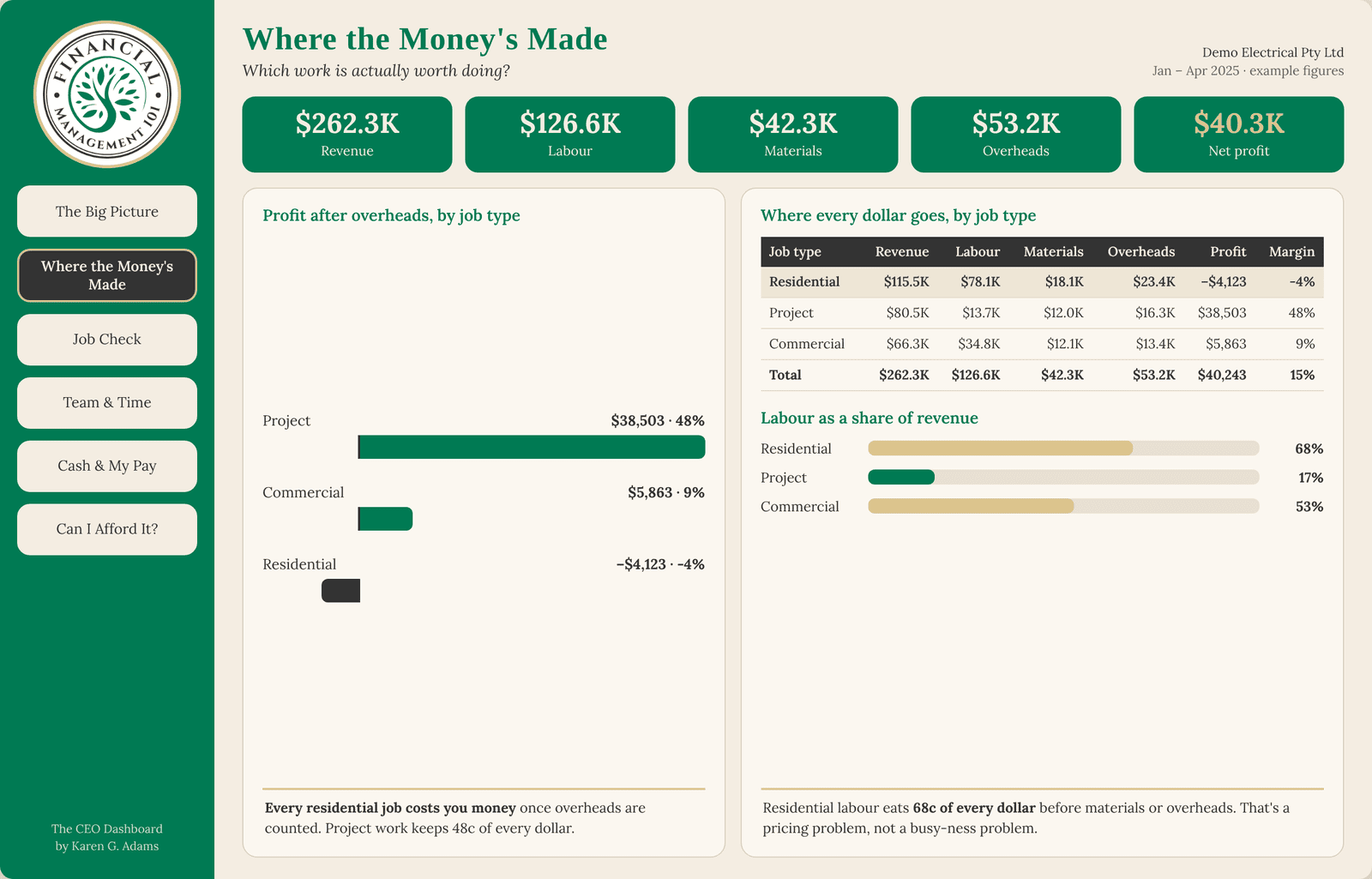
This screen breaks every dollar down by job type into revenue, labour, materials, overheads and profit. In the demo, project work keeps 48c in every dollar after overheads. Residential work, the biggest job type, is running at a loss: minus $4,123. For more on why busy doesn’t always mean profitable, read Why Is My Business Making Revenue, But No Profit?
Job Check: are we pricing jobs right?
This compares what each job was quoted at with what it actually cost, shows where the team went over or under budget, and lists the five jobs that cost the most.
So what does this actually look like?
Here’s the Job Check maths for the demo business (based on a real client, with names and some figures changed for privacy):
- Quoted cost: $159.4K
- Actual cost: $200.5K
- Over quote: about $41K, or 26%
- Jobs over budget: 318 of 764
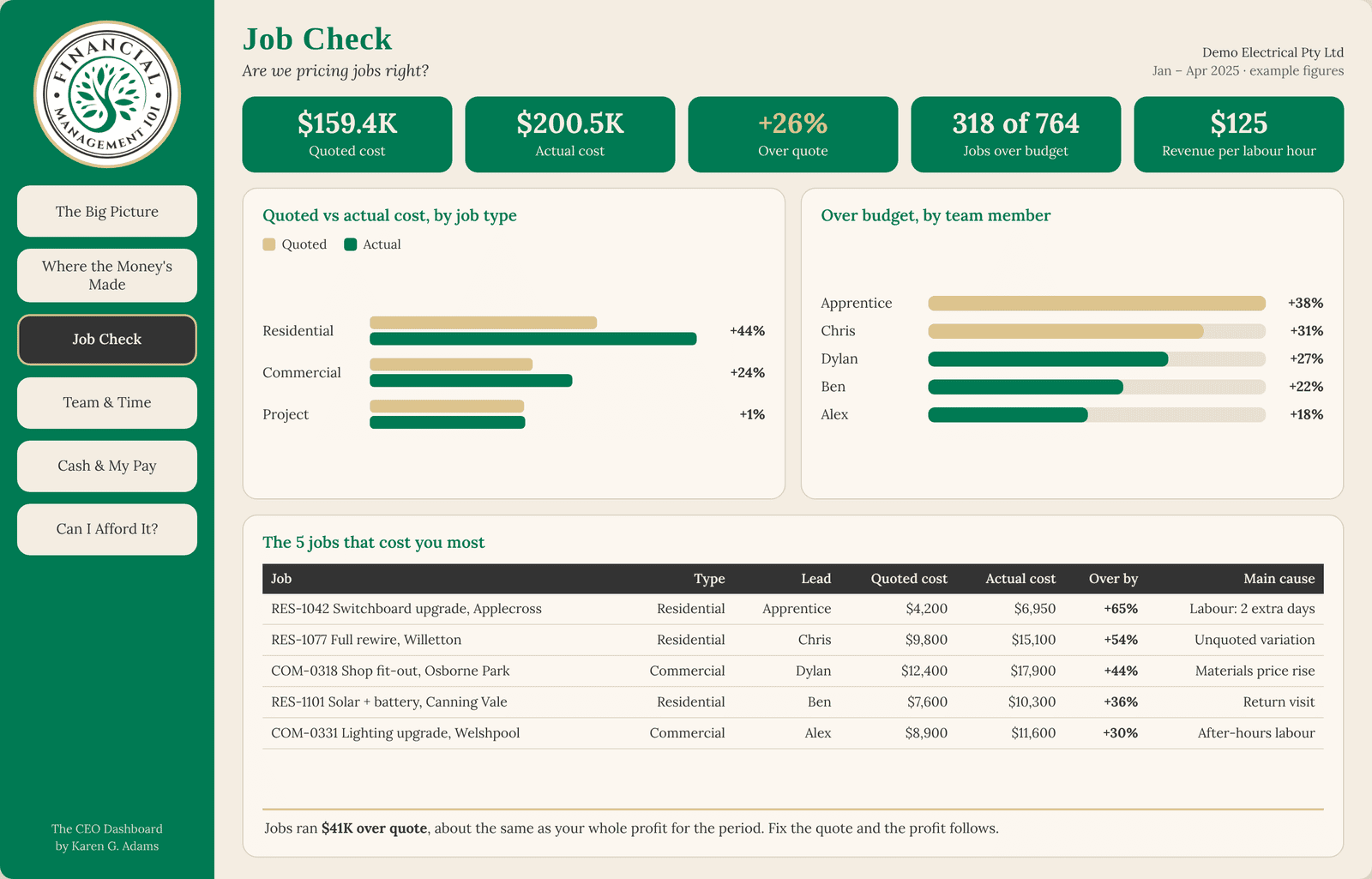
Now compare that $41K with the net profit for the same four months: $40.3K. The jobs ran over quote by about as much as the business made in profit. Fix the quote, and the profit follows. You’d never see that from the bank balance.
Team & Time: who is carrying the load?
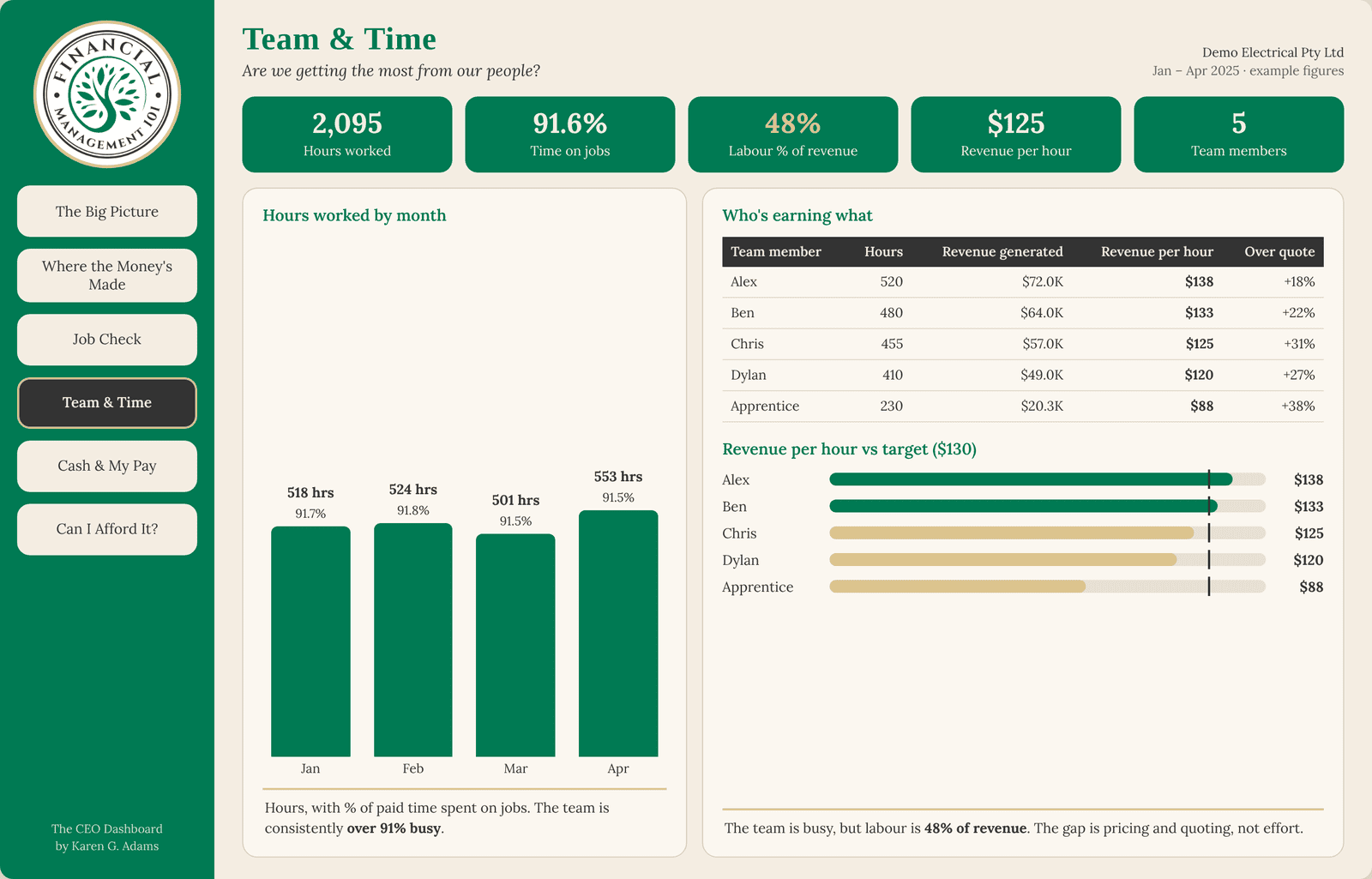
This shows revenue per hour against target, and who’s earning what. Naturally, the owner’s hours and charge-out hours are generally higher. But, as I say in the video, “this is where he was the bottleneck in the business.” The fix was to restructure a few things and help him see he needed to step away and trust his team more.
Cash & My Pay: what’s in the bank, what’s owed, what can I take?
“This business owner had over $48,000 sitting in unpaid invoices,” with 96 invoices overdue. Why? He was so busy he didn’t have time to stop and do the admin to get those debtors paid. The dashboard shows how much is outstanding at 0–30 days, 31–60, 61–90 and over 90 days.
One of the things I’m most passionate about is making sure your cash available means your tax and BAS are put aside, and your bills and wages for the next 30 days are covered. That way, if there’s a slow month, there’s still money there to pay your staff and your obligations. From there, the screen shows how much the owner could safely pay himself.
Can I Afford It? The new ute
The owner wanted to buy a new ute or put on another tradie. This screen tells him whether he can afford it, and gives the reasons why he can or can’t. As I put it in the video, “this is a great one when you want to go to your finance broker and say, I want to buy the ute, it’s looking good on paper now, so can you go and do a quote.”
For a quick test of how well you know your own numbers right now, try The Dashboard Test: Could You Answer These 7 Questions Right Now?
Your takeaway
- Learning something new is humbling. Sticking at it, when you can see where you’re heading, is worth it.
- Put the setup work in once, so you’re not rebuilding the picture every week.
- The hours matter, but how your business feels matters too. Make More, Keep More and Enjoy The Ride.
- If you’re flat out and spending nights and weekends trying to work out where the money is, The CEO Dashboard is built to show you on six screens.
Want your time and your fun back?
Take a sneak peek at The CEO Dashboard – New Look and see all six screens for yourself.
If this sounds like you, with a good business, flat out and missing the fun, book a call with me. It’s a 20-minute chat.
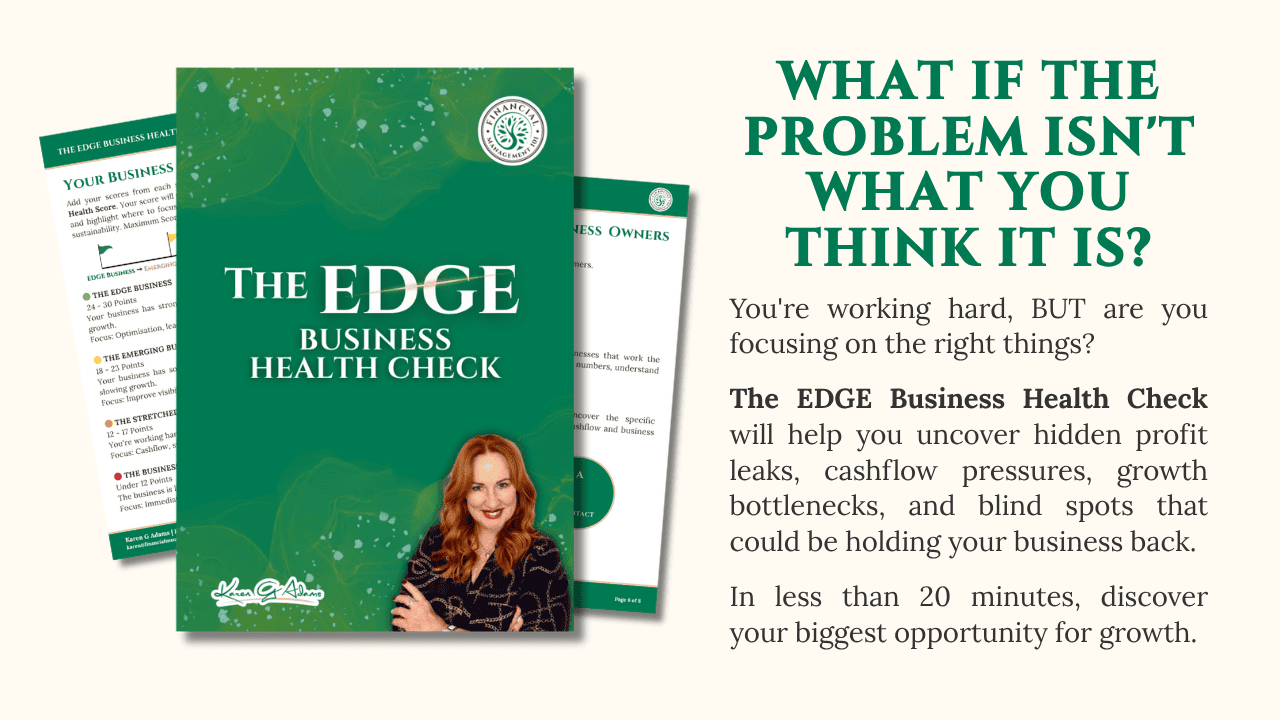
Not ready for a call? Start with The EDGE Business Health Check. It’s a $47 workbook that takes about 20 minutes, covering Profit & Pricing, Cashflow, CEO Visibility, Systems & Freedom, and Growth, with the Profit Leak Calculator to show where money may be slipping away.
Know a trade or service business owner who’s flat out and missing the fun? Send them this post.
Frequently asked questions
What did 40 hours on a new AI tool give Karen G. Adams back?
In my own business, about 100 hours back so far, a cleaned-up inbox, sales pages, links and workflows, and the fun back in my business. That’s my own experience, not a promise. Every business is different.
What does The CEO Dashboard do?
It brings your numbers together on six screens: The Big Picture, Where the Money’s Made, Job Check, Team & Time, Cash & My Pay, and Can I Afford It? So you’re not rebuilding the picture every week in spreadsheets.
Do I have to build The CEO Dashboard myself?
No. We work out what you need, build it for you and implement it, so you don’t go through the overwhelm of building the systems yourself.
Does The CEO Dashboard replace my accountant or bookkeeper?
No. Your accountant and bookkeeper keep your numbers and records right. The CEO Dashboard helps you use those numbers to run the business and make decisions.
Are the figures in the screenshots real?
They’re from Demo Electrical, a demo based on a real client, with names and some figures changed to protect the business’s identity and privacy.
You’ve built something real. Financial confidence starts with clarity.
Karen G. Adams
Small Business Performance Strategist, Financial Management 101
This article is general education only. It isn’t financial, tax or legal advice, and it doesn’t take your personal circumstances into account. The hours I mention are my own experience, not a promise of results. The dashboard screenshots show a demo based on a real client, with names and some figures changed for privacy. Check your own obligations with your BAS or tax agent/accountant or the ATO.