Your bank balance tells you what’s in the account today. That’s it. It doesn’t tell you whether you can pay the team in a quiet month, whether the GST and tax money is put aside, or what’s really left once everything’s paid.
If you’ve been watching my videos and thinking, “I don’t really understand cash flow, margins or net profit. All I know is what’s coming in and what the bank says”… you’re not alone. That’s exactly who I made this short video for.
By the end of this post you’ll know the four questions your bank balance can’t answer, why I built The CEO Dashboard, and what each of its six screens shows you, with a worked example from a demo business.
THE SHORT ANSWER
Why isn’t my bank balance enough to run my business?
Because it’s a snapshot of one day. It doesn’t show the money customers still owe you, the bills and wages due next month, or the GST and tax that’s already spoken for. As I say in the video, “what’s in the bank balance is not a true reflection of what’s going on in your business.”
What can’t your bank balance tell you?
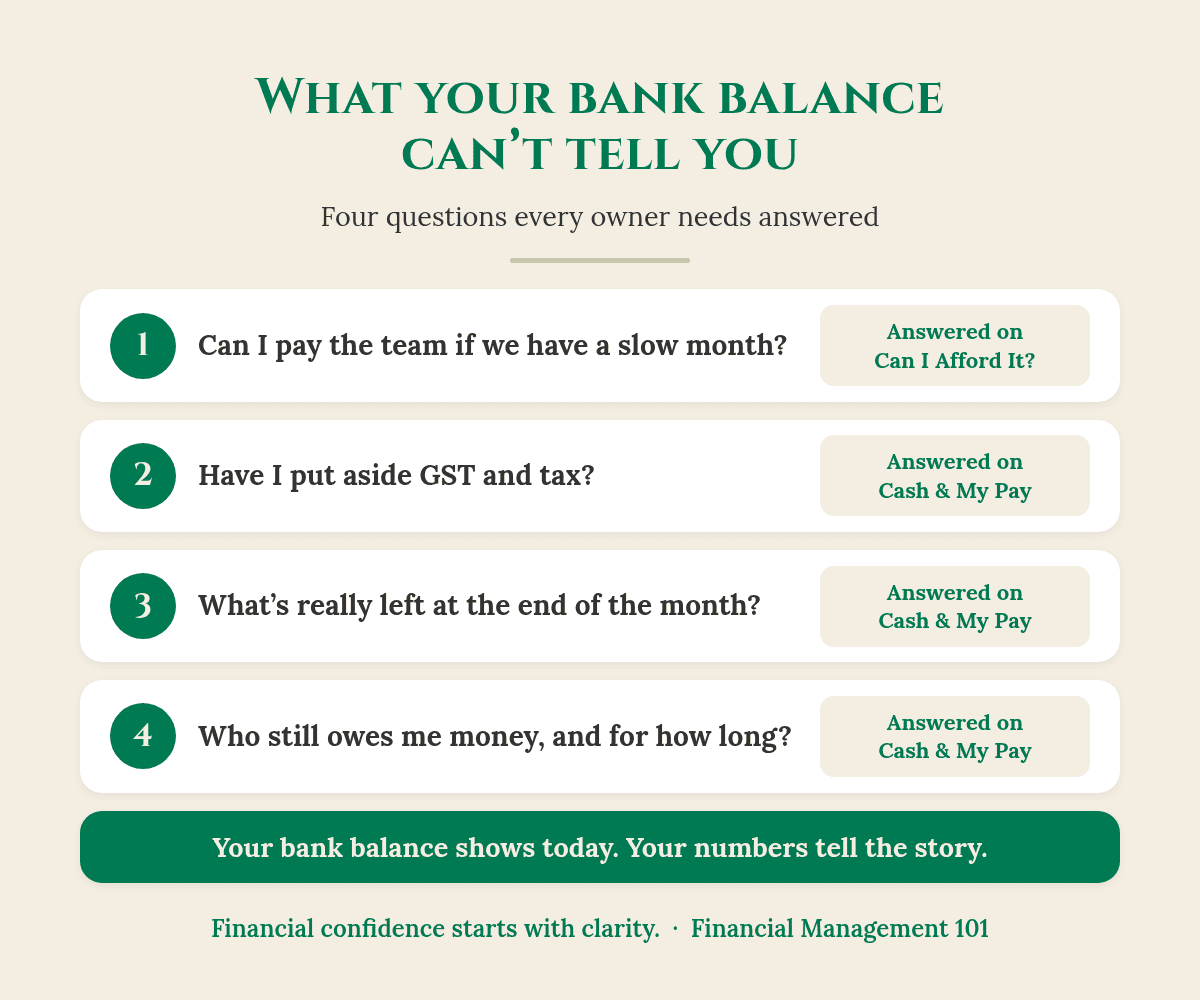
In the video I ask four questions. If you can’t answer them with confidence, the bank balance is doing the steering, not you.
1. Can you pay your team if you have a slow month?
A healthy balance this week can hide a thin month ahead. What matters is whether you have enough set aside to cover wages, super and fixed costs if the work slows down for a few weeks.
2. Have you put away the GST and tax?
Some of the money sitting in your account isn’t yours to spend. It belongs to the GST, PAYG withholding and income tax you’ll pay later. If it isn’t set aside, the balance looks bigger than it really is.
Good to know: if you can see a tax payment coming that you won’t be able to cover, talk to your BAS or tax agent/accountant early. Early is when you have the most options.
3. What’s left at the end of the month?
This is the question owners ask me most: after the team, the suppliers, the tax and the bills, what’s actually left, and what can I safely pay myself? The bank balance on its own can’t answer it.
4. Who still owes you money?
You’ve done the work and sent the invoice, and now you’re waiting for customers to pay. Until they do, that money isn’t in the bank. If cash always feels tight even when you’re busy, my post Why Is Cashflow Always Tight? explains why.
Check this first: take today’s bank balance and subtract the GST and tax you owe, plus the wages and bills due in the next 30 days. What’s left is a much more honest number than the one on your banking app.
Why I built The CEO Dashboard
“I have your back. That’s why I created The CEO Dashboard.” That’s how I put it in the video, and I mean it.
“It’s to make your life so much easier so you don’t have to be an accountant to understand your business. But you do need to know what to read in the numbers of your business, so you can run it like a business owner.”
You don’t have to be an accountant to understand your business.
In my 40 years in financial services, I’ve seen plenty of capable owners running good businesses by instinct and the bank balance. They’re not behind. Nobody taught them how to read the story their numbers tell.
The CEO Dashboard was built with you in mind, so you can step into the CEO role and understand, as I say in the video, “what money’s coming in, what’s going out, and what you can afford to pay yourself.”
What’s inside The CEO Dashboard?
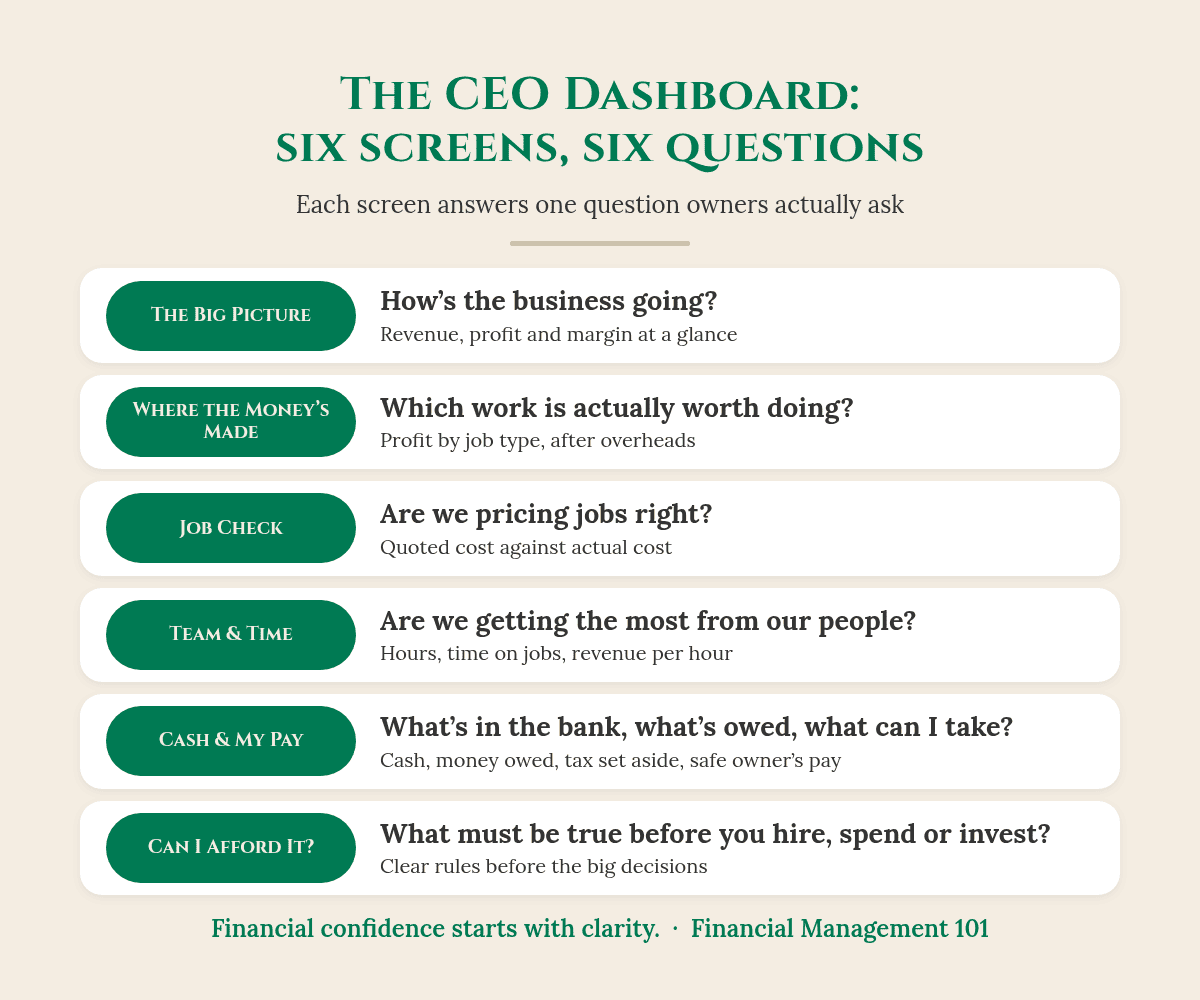
Each screen is built around one question that owners actually ask. Here are the six:
- The Big Picture: how’s the business going? Revenue, profit and margin by month, in one view.
- Where the Money’s Made: which work is actually worth doing, once labour, materials and overheads are counted?
- Job Check: are we pricing jobs right? Quoted cost against actual cost, job by job.
- Team & Time: are we getting the most from our people? Hours worked, time on jobs and revenue per hour.
- Cash & My Pay: what’s in the bank, what’s owed, and what can I safely take?
- Can I Afford It? What must be true before you hire, spend, discount or invest?
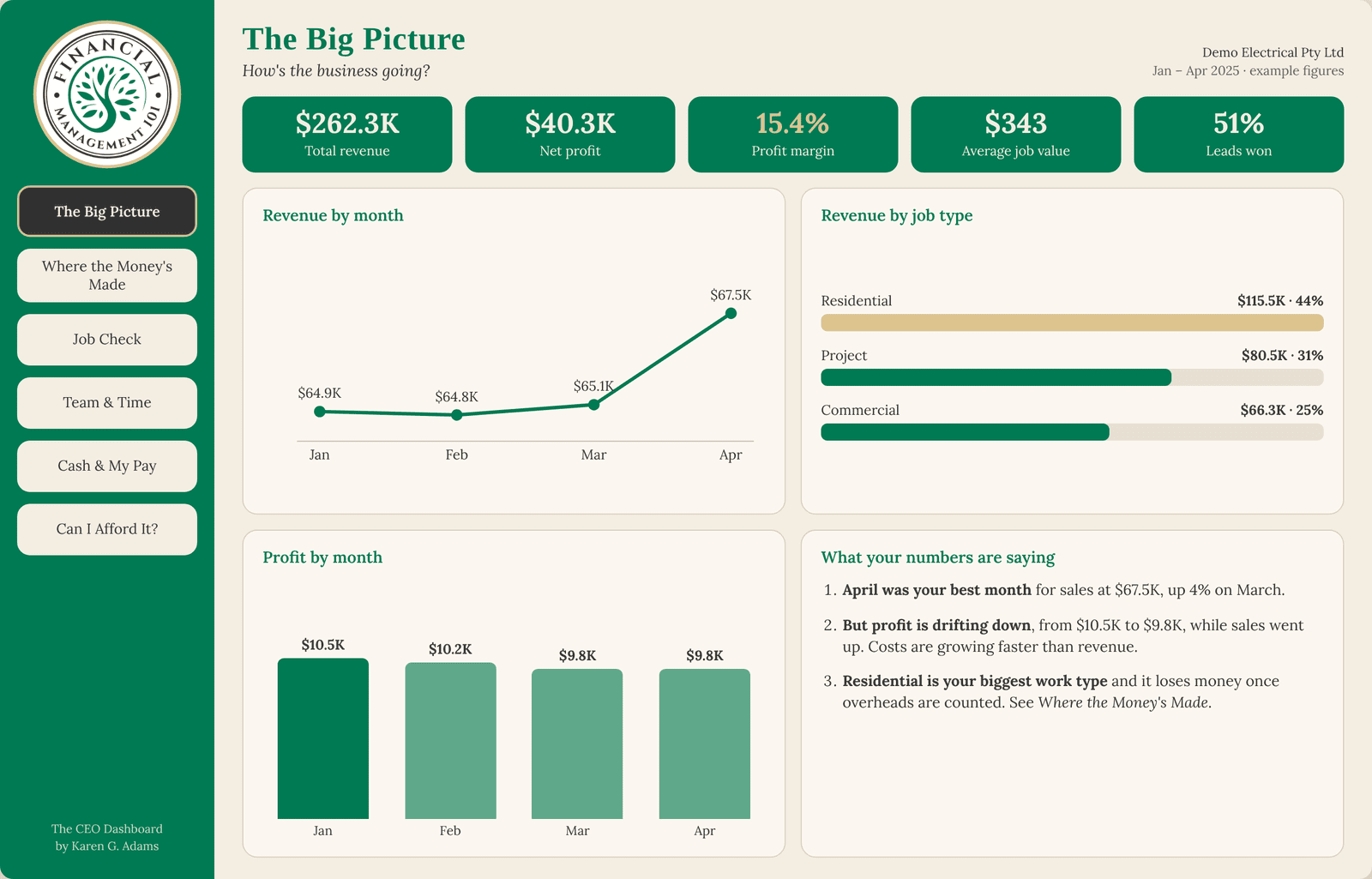
Look at the panel on the bottom right of The Big Picture: “What your numbers are saying.” In this demo business, April was the best month for sales, yet profit drifted down from $10.5K to $9.8K because costs grew faster than revenue. That’s the kind of story a bank balance will never show you. For a wider look at the numbers worth watching, read What Numbers Should a Small Business Owner Track?
So what does this actually look like?
Here’s the Cash & My Pay screen for the same demo business (based on a real client, with names and some figures changed for privacy). The bank balance says $48,200. Looks comfortable, right? Now watch what happens when you take out what’s already spoken for:
- Cash available: $48,200
- Less tax and BAS set aside: $14,600
- Less the next 30 days’ bills and wages: $24,200
- Safe to pay yourself: $9,400
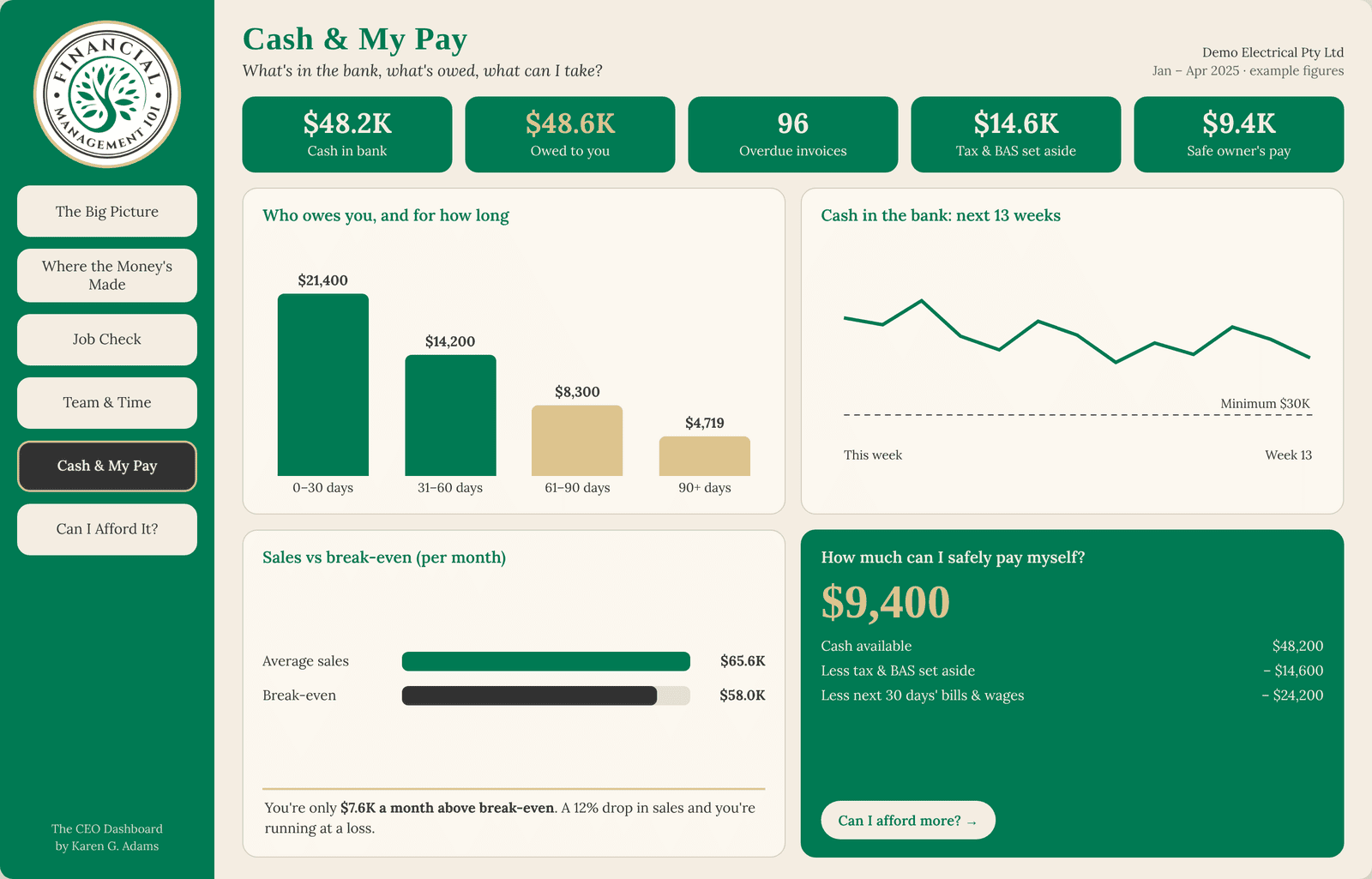
So $48,200 in the bank becomes $9,400 the owner can safely draw without touching the tax money or next month’s bills. Same business, same bank account, a very different decision.
The same screen shows $48,600 still owed by customers, with $4,719 of it more than 90 days old, plus the expected cash balance for each of the next 13 weeks. If you’d like to build that 13-week view yourself, my post on cash flow forecasting goes live this Monday and walks you through it.
Can I afford it? The question behind every big decision
Hire another person? Buy the ute? Drop a price to win a job? The Can I Afford It? screen sets out what has to be true first, and shows each answer as Ready, Watch or Not yet.
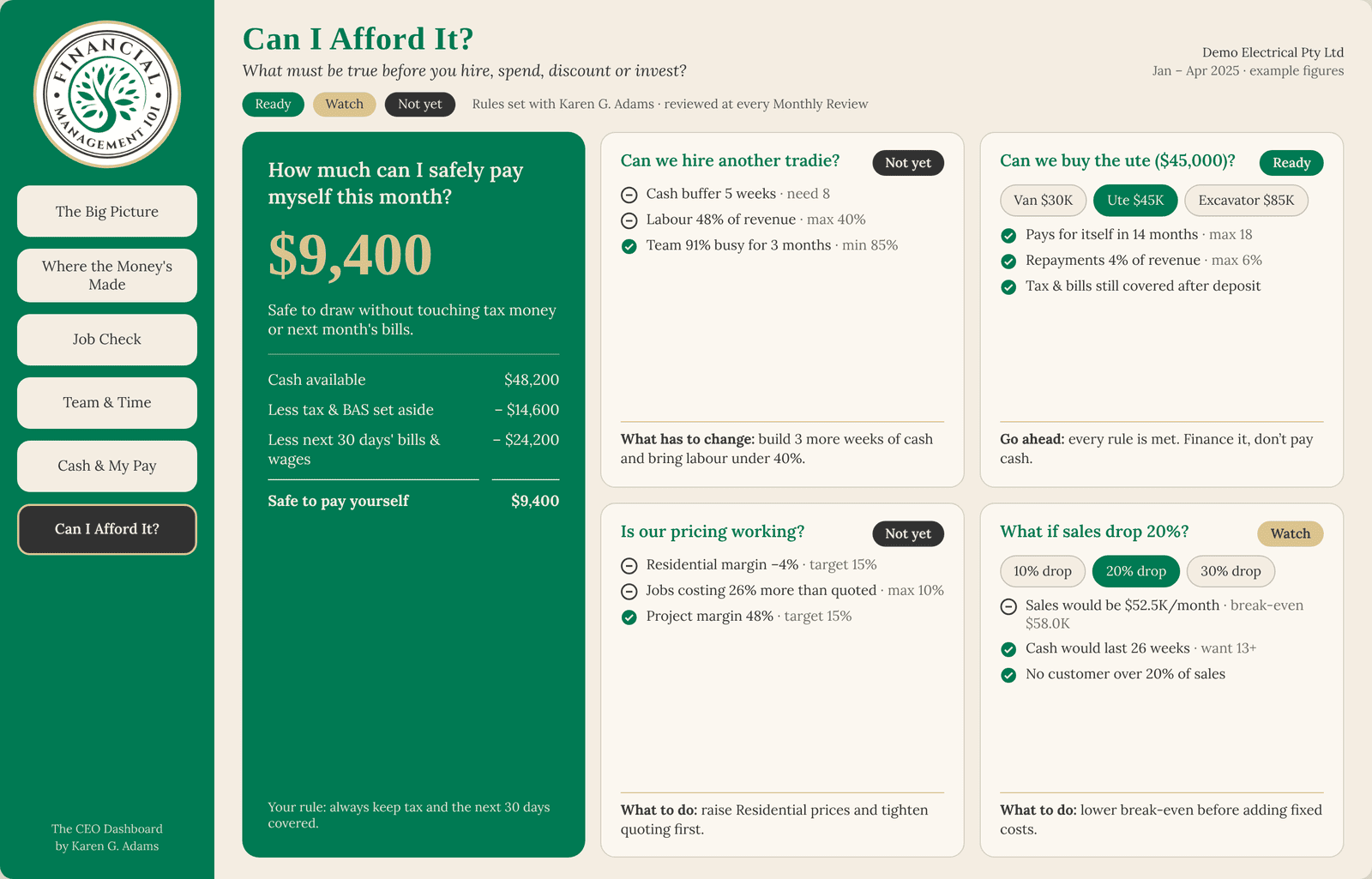
In the demo, buying a $45,000 ute is “Ready”: it pays for itself in 14 months and the tax and bills are still covered after the deposit. Hiring another tradie is “Not yet”, because the cash buffer is 5 weeks against the 8 needed and labour is 48% of revenue against a 40% limit. The screen also shows exactly what has to change before the answer becomes yes.
That’s the shift from “I think we can” to “I know we can”, before the money leaves the account.
Your takeaway
- Your bank balance shows today. It doesn’t show what’s owed to you, what you owe, or what’s already set aside for tax.
- Four questions to answer every month: can I pay the team in a slow month, is the GST and tax put aside, what’s really left, and who still owes me?
- You don’t need to be an accountant. You do need to know how to read the story your numbers tell.
- The CEO Dashboard puts that story on six screens, so you can make decisions like the CEO of your business.
Your accountant makes sure the numbers are right. Your bookkeeper makes sure the records are right. My job is to help you know what to do with them.
Want to see the story your numbers are telling?
Take a sneak peek at The CEO Dashboard – New Look and see all six screens for yourself.
Rather talk it through first? book a call with me and we’ll look at what your business needs.
Know an owner who needs this? Send them this post.
Frequently asked questions
Do I need to be an accountant to use The CEO Dashboard?
No. That’s the whole point. As I say in the video, you don’t have to be an accountant to understand your business. You do need to know what to read in your numbers, and each screen is built around a plain-English question to make that easier.
Why isn’t my bank balance a true picture of my business?
Because it only shows what’s in the account today. It doesn’t take out the GST and tax you owe or the bills and wages coming up, and it doesn’t include money customers still owe you.
Does The CEO Dashboard replace my accountant or bookkeeper?
No. Your accountant and bookkeeper keep your numbers and records right. The CEO Dashboard helps you use those numbers to run the business and make decisions.
What are the six screens in The CEO Dashboard?
The Big Picture, Where the Money’s Made, Job Check, Team & Time, Cash & My Pay, and Can I Afford It? Each one answers a single question, from “how’s the business going?” to “what must be true before I hire, spend or invest?”
Are the figures in the screenshots real?
They’re from a demo based on a real client, Demo Electrical, with names and some figures changed to protect the business’s identity and privacy. Your own dashboard is built from your business’s numbers.
You’ve built something real. Financial confidence starts with clarity.
Karen G. Adams
Small Business Performance Strategist, Financial Management 101
This article is general education only. It isn’t financial, tax or legal advice, and it doesn’t take your personal circumstances into account. The dashboard screenshots show a demo based on a real client, with names and some figures changed for privacy. Check your own obligations with your BAS or tax agent/accountant or the ATO.